Showing posts with label crm 2013. Show all posts

December 3, 2014

Browser compatibility & Dynamics CRM: a complicated marriage

The introduction of browser compatibility in Dynamics CRM (launched with UR12 for CRM 2011) was a big step for everybody using the platform, sadly this important change wasn't painless.
Several CRM implementations were done considering that Internet Explorer was the only compatible browser and this was quite the standard until CRM 4.0. With CRM 2011 Microsoft provided JavaScript supported methods (the Xrm namespace) to interact with Dynamics CRM in order to avoid DOM Manipulation.

Dynamics CRM developers struggle everyday between top-notch requirements and the limits of supported customizations, an endless fight without a definitive winner.

From some months a new variable must be considered: the browser used and its version. I already wrote about the argument (The browser compatibility cake is a lie) but new issues surfaced with the latest version of Google Chrome (V39) and a small recap regarding the browser compatibility can be useful.

Fact number 1: The supported browsers are Internet Explorer, Firefox, Google Chrome, Safari.
Not all OS are supported, for example Firefox and Google Chrome are not supported on Mac OSX, so it's necessary to check the compatibility lists.

Fact number 2: Google Chrome is the browser that caused most of the issues.
It's started with V37 with the removal of the showModalDialog method (fix link) and continued in V38 with the partial introduction of ES6 support (details link). V39 has a window.close error connected to the showModalDialog function (Chromium issue), where the popups (like a solution import) don't close by themselves after they completed the job.

Fact number 3: showModalDialog will work only until 30 April 2015.
The EnableDeprecatedWebPlatformFeatures setting states clearly that is until the end of next April. Less than 5 months for this temporary solution. Maybe the HTML5 tag <dialog> will be used?

Fact number 4: Google doesn't provide an archive of Google Chrome releases.
You want to install Google Chrome V36? You need to find the offline setup somewhere else. Remember that installing an older browser version is not suggested (security reasons).

Personally I don't like the phrase "Internet Explorer is the preferred browser for Dynamics CRM" that sometimes I read in some forums, because Microsoft invested time and resources to provide the browser compatibility for Dynamics CRM, efforts vanished for the most part by an "aggressive" update policy of Google Chrome.
Keep informed your users about the browser compatibility status and guide them in the choice of the browser used for Dynamics CRM.

October 29, 2014

Open CRM 4.0 and CRM 2011 instances using previous Internet Explorer versions

Dynamics CRM 2015 will be available soon but many customers are still using successfully CRM 4.0 (released in 2007) or CRM 2011 (nearly 4 years old) for their business processes. On the other hand we have Operating Systems and browsers updated regularly due to security reasons or machine upgrades.

Dynamics CRM has been always compatible with Internet Explorer but not with all the versions, we can't expect to use Internet Explorer 6 with the latest version or pretend to use IE11 with CRM 4.0.

As developer I faced this issue when I upgraded my PC to Windows 8 and Internet Explorer 11, I wasn't able anymore to use a CRM 2011 instance, the mobile version was prompted to me.


CRM 2011 is compatible with Internet Explorer 11, but it must have Rollup 17 installed, and that wasn't the case.
Which Internet Explorer version can be used in order to access correctly Dynamics CRM? Assuming we don't know if a rollup is installed, the IE versions that can be used with RTM are:

Internet Explorer 6 and 7 for CRM 4.0
Internet Explorer 7, 8 and 9 for CRM 2011
Internet Explorer 8, 9, 10 for CRM 2013

Based on this data Internet Explorer 7 is the best candidate for CRM 4.0 and CRM 2011. We can rely on a Virtual Machine in order to use a previous Internet Explorer version without messing up our current environment.

Creating a VM is a tedious process and it can take several hours. Lucky for us Microsoft provides a set of Internet Explorer VMs ready to be downloaded.
They are available at modern.IE, the intended use is to test a website compatibility with old browsers but they are also good to access occasionally to Dynamics CRM. I wrote occasionally because these VMs are not meant for a production use and the Windows version included is a trial.
If it's necessary to use constantly an older browser (or you have a Mac) it's better to build a proper VM with the right licenses.
The following VMs are available at modern.IE:

IE 6 - Windows XP
IE 8 - Windows XP
IE 7 - Windows Vista
IE 8 - Windows 7
IE 9 - Windows 7
IE 10 - Windows 7
IE 11 - Windows 7
IE 10 - Windows 8
IE 11 - Windows 8.1

Personally I use VirtualBox (you need to disable Hyper-V in Windows 8 to get better performances) but the VMs are available also for Hyper-V, VMWare, Virtual PC and Parallels.

October 20, 2014

Google Chrome 38 Lookup Fix

In my previous post I analyzed the lookup issue caused by the latest version of Google Chrome (link) but I wasn't able to provide a solution.

UPDATE:
Google Chrome 38.0.2125.111 fixed the lookup error, please update it.

Some days ago Jon Grant wrote a JavaScript patch based on my post, you can find it here:
http://jongrant.org/2014/10/17/patch-for-chrome-38-lookup-error-in-dynamics-crm-2013/

His solution is unsupported but effective. Starting from his JavaScript patch I created a managed solution that includes this (unsupported) fix in all the entity forms.
The solution works with CRM 2013, but it's not tested with CRM 2011 UR12+.

Download from Codeplex:
https://chrome38lookupfix.codeplex.com/

REMEMBER THAT THIS SOLUTION IS UNSUPPORTED.

October 10, 2014

Lookup errors with Google Chrome 38

Google released a new version (38.0.2125.101) that breaks (again) Dynamics CRM. When users try to open a lookup they get the following error:

Currently there isn't a fix for this issue and it is not related to the previous showModalDialog issue.

UPDATE:
Google Chrome 38.0.2125.111 fixed the lookup error, please update it.

A managed solution (unsupported) that fix this issue is available:
Google Chrome 38 Lookup Fix

Offline installers of Google Chrome V37 (32 and 64 bit) are available:
Google Chrome 37.0.2062.124 32 bit (MD5: 6CF617A12FB9B7169B6C69D328F63389)
Google Chrome 37.0.2062.124 64 bit (MD5: 91644DE37A8EC506163FCBBCBD9AD0E4)

Microsoft Support KB Article regarding this issue: http://support2.microsoft.com/kb/3008160

Now I will explain what and how Google Chrome broke the lookup functionality:

When the user opens a lookup, CRM calls the web service AppWebServices/LookupService.asmx (message RetrieveInlineSearchResults) in order to fetch the preview records:

With Internet Explorer and Firefox the web service returns 200 (OK) but with Google Chrome it returns 500 (Internal Server Error). Which is the difference between the POST request made by Chrome and the other browsers?
The correct request body is the following:
<?xml version="1.0" encoding="utf-8" ?>
<soap:Envelope xmlns:soap="http://schemas.xmlsoap.org/soap/envelope/" xmlns:xsi="http://www.w3.org/2001/XMLSchema-instance" xmlns:xsd="http://www.w3.org/2001/XMLSchema">
    <soap:Body>
        <RetrieveInlineSearchResults xmlns="http://schemas.microsoft.com/crm/2009/WebServices">
            <typesArray>
                <int>1</int>
                <int>2</int>
            </typesArray>
            <bindingColumns></bindingColumns>
            <additionalParameters>...</additionalParameters>
            <positions>
                <int>0</int>
            </positions>
            <resolveEmailAddress>false</resolveEmailAddress>
            <savedQueryTypeParameter></savedQueryTypeParameter>
            <defaultViewId></defaultViewId>
            <values>
                <string></string>
            </values>
            <sortResults>true</sortResults>
        </RetrieveInlineSearchResults>
    </soap:Body>
</soap:Envelope>
Chrome V38 doesn't add the piece
            <values>
                <string></string>
            </values>
causing the web service call to fail.
I debugged the CRM JavaScript and I found the connected piece of code (JsProvider.ashx):
!isNullOrEmptyString($v_D) && $v_0.SetParameter("values", $v_6);
$v_6 contains the text inside the lookup, after CRM will put this value inside an array called aParameters (script global.ashx) in order to build the SOAP request.
CRM doesn't use an object but an array to handle the values and check with a function called IsNull if the value is already inside the parameters:
function pushCommandParameter(oParameter) {
    // oParameter.Name is "values"
    if (!IsNull(aParameters[oParameter.Name])) // Google Chrome returns always true when oParameter.Name is "values" !!!
        aParameters[aParameters[oParameter.Name]] = oParameter;
    else {
        aParameters[oParameter.Name] = aParameters.length;
        aParameters.push(oParameter);
    }
}
Google Chrome returns something when you access the property "values" of an array. This can be easily tested:
var myArray = new Array();
alert(myArray['values']); // it returns function values() { [native code] }
alert(myArray['anotherparameter']); // it returns undefined
Due to this new behavior of the arrays the SOAP request is not created correctly (the missing <values><string></string></values> piece) and CRM returns 500 (Internal Server Error).

Which is the reason of this change? Google Chrome V38 introduced a partial support for ECMAScript 6, including the method Array.prototype.values() that causes this behavior and consequently the lookup errors inside Dynamics CRM.

A fix is not available (an update of Google Chrome or Dynamics CRM is the only solution) so if you still have Google Chrome V37 you can disable the auto-update (instructions here) or use another browser (Internet Explorer or Firefox).

October 9, 2014

The Xrm.Page.data.refresh method

CRM 2013 introduced new client APIs, one is the Xrm.Page.data.refresh method.
The MSDN definition is:
Asynchronously refreshes and optionally saves all the data of the form without reloading the page.
Xrm.Page.data.refresh(save).then(successCallback, errorCallback);
Why we leverage on this method?
The obvious reason is that we want the actual data displayed on the form, the inner reason is due to the Dynamics CRM platform, a record can be updated in several ways including workflows or plugins operating server-side.
Most of the server-side events don't refresh the UI, but with the Xrm.Page.data.refresh method we can manually force the page to display the current values.

If we want a simple refresh we can just write:
Xrm.Page.data.refresh(false);
A small advice will appear during the operation

October 7, 2014

Dynamics CRM Compatibility List URLs

Microsoft updated the support page for Dynamics CRM and divided the Compatibility List based on the version.

The new URLs are:

Compatibility with Microsoft Dynamics CRM 2013
Compatibility with Microsoft Dynamics CRM 2011
Compatibility with Microsoft Dynamics CRM 4.0

My page Resources for CRM Developers has been updated to include these links.

September 29, 2014

Check if a User has a specific Privilege

I came across a question on Dynamics Community forums where the asker wanted to check if a CRM User has or not a specific privilege of a custom entity.

He wanted to avoid the use of the RetrievePrincipalAccessRequest because it requires to provide an existing record id in order to perform the request. I agree with this, in addition the result of a RetrievePrincipalAccessRequest doesn't guarantee that the user has the privilege, but only that the user can access to that specific record (for example when the record is only shared to the user).

A good aspect of the privileges is that they respect a naming convention, so the Read privilege for the Account entity is called prvReadAccount, the Write privilege prvWriteAccount, etc etc. This naming convention is valid also for custom entity, so if we have an entity called new_SMS and we want to know if the user can create a new_SMS record, we will check for the prvCreatenew_SMS privilege.

The easy way it to check first that the privilege is inside the CRM and after to compare its Id with the values returned by a RetrieveUserPrivilegesRequest:
bool userHasPrivilege = false;

ConditionExpression privilegeCondition =
    new ConditionExpression("name", ConditionOperator.Equal, "prvCreatenew_SMS"); // name of the privilege
FilterExpression privilegeFilter = new FilterExpression(LogicalOperator.And);
privilegeFilter.Conditions.Add(privilegeCondition);

QueryExpression privilegeQuery = new QueryExpression
{
    EntityName = "privilege",
    ColumnSet = new ColumnSet(true),
    Criteria = privilegeFilter
};

EntityCollection retrievedPrivileges = service.RetrieveMultiple(privilegeQuery);
if (retrievedPrivileges.Entities.Count == 1)
{
    RetrieveUserPrivilegesRequest request = new RetrieveUserPrivilegesRequest();
    request.UserId = userId; // Id of the User
    RetrieveUserPrivilegesResponse response = (RetrieveUserPrivilegesResponse)service.Execute(request);
    foreach (RolePrivilege rolePrivilege in response.RolePrivileges)
    {
        if (rolePrivilege.PrivilegeId == retrievedPrivileges.Entities[0].Id)
        {
            userHasPrivilege = true;
            break;
        }
    }
}
The hard way it to build a single MEGA query to perform the same check (4 LinkEntity!):
bool userHasPrivilege = false;

QueryExpression privilegeQuery = new QueryExpression("privilege");
privilegeQuery.ColumnSet = new ColumnSet(true);
LinkEntity privilegeLink1 = new LinkEntity("privilege", "roleprivileges", "privilegeid", "privilegeid", JoinOperator.Inner);
LinkEntity privilegeLink2 = new LinkEntity("roleprivileges", "role", "roleid", "roleid", JoinOperator.Inner);
LinkEntity privilegeLink3 = new LinkEntity("role", "systemuserroles", "roleid", "roleid", JoinOperator.Inner);
LinkEntity privilegeLink4 = new LinkEntity("systemuserroles", "systemuser", "systemuserid", "systemuserid", JoinOperator.Inner);

ConditionExpression userCondition = new ConditionExpression("systemuserid", ConditionOperator.Equal, userId); // // Id of the User
ConditionExpression privilegeCondition = new ConditionExpression("name", ConditionOperator.Equal, "prvCreatenew_SMS"); // name of the privilege

privilegeLink4.LinkCriteria.AddCondition(userCondition);
FilterExpression privilegeFilter = new FilterExpression(LogicalOperator.And);
privilegeFilter.Conditions.Add(privilegeCondition);
privilegeQuery.Criteria = privilegeFilter;

privilegeLink3.LinkEntities.Add(privilegeLink4);
privilegeLink2.LinkEntities.Add(privilegeLink3);
privilegeLink1.LinkEntities.Add(privilegeLink2);
privilegeQuery.LinkEntities.Add(privilegeLink1);

EntityCollection retrievedPrivileges = service.RetrieveMultiple(privilegeQuery);
if (retrievedPrivileges.Entities.Count > 0) { userHasPrivilege = true; }

September 28, 2014

Entity.GetAttributeValue<T> and ActivityParty

GetAttributeValue<T> is a method of the Entity class, it is used to retrieve easily the entity's values. You can find a detailed overview by Dave Berry here:
Entity.GetAttributeValue Explained

Dynamics CRM includes a special data type called ActivityParty (an overview here) and despite its special status we can still use GetAttributeValue<T> method against the fields using this data type.

First of all the ActivityParty attributes hold an EntityCollection of activityparty entities, these entities are a pointer to the real records through the partyid attribute (EntityReference).
Entity email = service.Retrieve("email", emailId, new ColumnSet(true));
EntityCollection to = email.GetAttributeValue<EntityCollection>("to");
A big difference when using the GetAttributeValue<T> with the EntityCollection than the EntityReference is the case when the attribute is null.

With EntityReference the method GetAttributeValue<T> returns a null if the attribute is empty.
EntityReference parentAccountRef = account.GetAttributeValue<EntityReference>("parentaccountid");
if (parentAccountRef != null) { /* code here */ }
With EntityCollection we can have null if the attribute is not inside the collection or an EntityCollection with no values inside the Entities property if the attribute is empty but inside the attributes list.
The second scenario is very common, for example when retrieving an email, the attributes from,to,cc,bcc are always returned.
Entity email = service.Retrieve("email", emailId, new ColumnSet(true));
EntityCollection to = email.GetAttributeValue<EntityCollection>("to");
EntityCollection cc = email.GetAttributeValue<EntityCollection>("cc");
if (to != null) { Console.WriteLine("Records inside To: " + to.Entities.Count.ToString(); }
if (cc != null) { Console.WriteLine("Records inside Cc: " + cc.Entities.Count.ToString(); }
Even if we have an usable EntityCollection, it's necessary additional code to get the reference to the real records contained inside the ActivityParty attributes.
To simplify the access to the values I created an extension method (called GetEntityReferenceCollectionValue) to return an EntityReferenceCollection from an ActivityParty field:
public static EntityReferenceCollection GetEntityReferenceCollectionValue(
    this Entity entity, string attributeLogicalName)
{
    EntityReferenceCollection entityReferenceCollection = new EntityReferenceCollection();
    EntityCollection entityCollection = entity.GetAttributeValue<EntityCollection>(attributeLogicalName);
    if (entityCollection != null)
    {
        foreach (Entity item in entityCollection.Entities)
        {
            EntityReference partyIdReference = item.GetAttributeValue<EntityReference>("partyid");
            if (partyIdReference != null) { entityReferenceCollection.Add(partyIdReference); }
        }
    }
    return entityReferenceCollection;
}
EntityReferenceCollection is a class that holds a list of EntityReference, it's normally used inside the Associate/Disassociate operations, but nothing stop us to reuse it to hold all the EntityReference entries of an EntityCollection.

The use is straightforward:
Entity email = service.Retrieve("email", emailId, new ColumnSet(true));
EntityReferenceCollection to = email.GetEntityReferenceCollectionValue("to");
If it's necessary to retrieve the actual entities I created a method called GetEntitiesFromEntityReferenceCollection, it requires as parameters the IOrganizationService and the EntityReferenceCollection. The value returned is an IEnumerable<Entity>:
public static IEnumerable<Entity> GetEntitiesFromEntityReferenceCollection(
    IOrganizationService service, EntityReferenceCollection entityReferenceCollection)
{
    List<Entity> entities = new List<Entity>();
    foreach (EntityReference entityReference in entityReferenceCollection)
    {
        try
        {
            Entity entity = service.Retrieve(entityReference.LogicalName, entityReference.Id, new ColumnSet(true));
            entities.Add(entity);
        }
        catch { }
    }
    return entities.AsEnumerable<Entity>();
}
Example:
Entity email = service.Retrieve("email", emailId, new ColumnSet(true));
EntityReferenceCollection to = email.GetEntityReferenceCollectionValue("to");
var toEntities = GetEntitiesFromEntityReferenceCollection(service, to);

September 21, 2014

Manage multiple Dynamics CRM users with Google Chrome

Google Chrome is one of the supported browsers for Dynamics CRM, many users choose it because it's faster than Internet Explorer or because they need to access different CRM instances or the same instance with a different role, for example they use Internet Explorer to login with a System Administrator user and Google Chrome with a Sales Manager one.

This last scenario is very common for developers, consultants or administrators, they deal with different customers or CRM trials so everytime is necessary to sign out, find the username/password, sign in again, etc etc.

A very useful functionality offered by Google Chrome is the possibility to have multiple users on the same machine, each user will act as a standalone browser without sharing the settings. We can rely on this function in order to switch easily between Dynamics CRM users and/or instances.

Step by Step tutorial:

Open the Google Chrome menu on the browser toolbar and select Settings.
In the Users section, click Add new user...

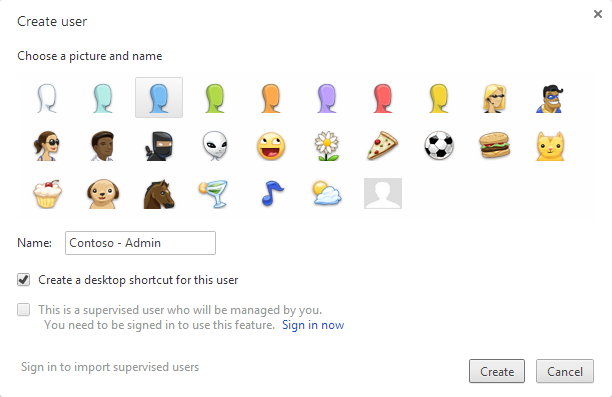
The following dialog will appear, select an icon and a name


You can select to have a desktop shortcut, to access directly the new user


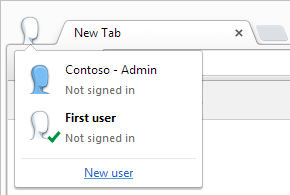
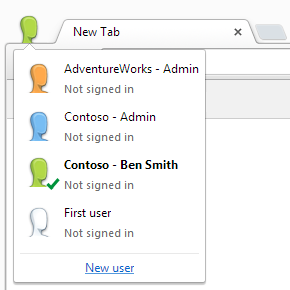
You can easily switch between the user by clicking the icon in the top left corner


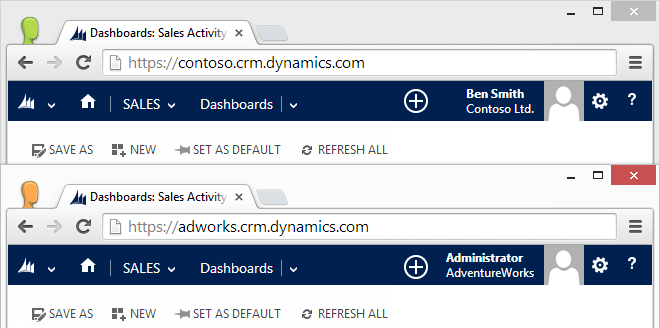
You can create users for different organizations or users for the same organization


And more important, you can run multiple users at the same time

September 12, 2014

Google Chrome registry fix for Dynamics CRM 2011/2013

Due to the errors caused by the latest Google Chrome update (details here) I created .reg file to reactivate showModalDialog API, you can download from here:

Enable Chrome showModalDialog.reg

After the download is completed close Google Chrome, double-click the .reg file and click Yes to the Registry Editor prompt:

I also created a page to test the showModalDialog API:

Test Page for showModalDialog API

September 8, 2014

The (browser compatibility) cake is a lie

Some days ago Google updated Google Chrome reaching version 37. Several Dynamics CRM users reported issues with this version like:
  • Export to Excel is not working
  • System settings are not saved
  • Form editor doesn't accept the changes
UPDATE:
A registry fix is available:
Google Chrome registry fix for Dynamics CRM 2011/2013

The reason is that showModalDialog API has been deprecated inside Chromium (the engine used by Google Chrome) more information here:
Disabling showModalDialog
Neil McDonald found a solution using a Group Policy, details in his blog:
Chrome 37 breaks CRM 2011 functionality

The current solution is "use another browser".

And before you are able to finish the word "browser" the obvious question is prompted to you: "But Microsoft states that Dynamics CRM is supported on the latest browser versions, why it's not working?"

The question is totally legit and MSDN has also a page about: Web application requirements for Microsoft Dynamics CRM 2013

Microsoft simply made a promise they can't always deliver, because they don't develop Google Chrome or the other browsers they decided to support, ergo "the cake is a lie".
With Google Chrome there is also another problem: you can't rollback to an older version because Google doesn't keep a public archive of their builds. So another question surfaces: "How can I avoid to have these issues again?"

The answer is to prioritize the supported browsers, naturally Internet Explorer will be your first choice (version 11, not version 8 please) and Firefox as an alternative, because they keep a public archive of their builds: https://ftp.mozilla.org/pub/mozilla.org/firefox/releases/
If in the future a Firefox release is not compatible with Dynamics CRM, the users can always install the previous working version (shame on you Google Chrome!).

August 20, 2014

South America Data Center Discovery URL

Recently Dynamics CRM Online has expanded its availability to several countries.
The announcement included another big news for the platform, the opening of a new data center located in Brazil to serve South America customers.

Microsoft defined also the Discovery Web Service URL of this data center, the address is:
https://disco.crm2.dynamics.com/XRMServices/2011/Discovery.svc

The data center is identified by the crm2 host, this will affect also the organization url, for example if Contoso Ltd. chooses the Brazil data center, its url will be:
https://contoso.crm2.dynamics.com

The relative MSDN page has been updated to include this change, the next table is a recap:

HostLocation
crmNorth America
crm4EMEA
crm5APAC
crm2South America

August 16, 2014

Dynamics CRM Mug Shot

Note: This is just a demo done in my spare time, nothing less nothing more

Dynamics CRM 2013 has the ability to display an image inside the form but in my opinion too many clicks are required to change it. First you need to click the picture box, wait that the dialog is loaded, click browse..., find the picture in your pc, click Open and finally click OK.

Note: This is an unsupported customization

I created a JavaScript library to make easier this procedure, it enable the picture box to be a target for a drag&drop, so you just need to drag your picture and it will be saved to CRM!

Because the code will run in the OnLoad event, it will take a bit to modify the picture box, you will notice a dashed border when the picture box is enabled for drag&drop:

You can download the library from my OneDrive:
mugshot.js

It is necessary to add the library to the form and attach the InitializeMugShot function to the OnLoad event.

But wait there's more...

I created also a WPF Application (I'm not a big fan of WPF but has its advantages) to grab a snapshot from your camera with the size required by Dynamics CRM (144x144 pixels):


The snapshots listed in the right part are draggable, so you can drag the snapshot you just took from your webcam directly to the CRM picture box! (or you can drag them to the desktop if you want to save as file).

you can download the application from my OneDrive:
MugShot.zip

Enjoy!

August 7, 2014

Dynamics CRM special data types

Dynamics CRM includes some data types not available for custom fields. Because these field types act slightly different from the standard ones, it's necessary to pay attention during development.

This post is focused on the following data types:
  • Owner
  • Customer
  • Party List (ActivityParty)
Owner
Owner is a data type used for the built-in OnwerId field. This field is present only when an entity has the Ownership set to User or Team, it's not present if the entity's ownership is Organization. It can hold one user or one team record.

Customer
Customer data type is used when a field can hold one account or one contact record. Contact and Lead entities use this data type (ParentCustomerId and CustomerId respectively).

Party List
Party List (also known as Activity Party) is the most complex data type, it can hold more than one record at the same time and the possible entities are defined by the ParticipationTypeMask attribute.
For example the Email To field can hold all these entities:


Client-side (JavaScript)
Handling these data types in JavaScript is quite easy, they look like and act as standard lookup fields, we need to only pay attention to the entity LogicalName (property entityType) of the record(s).

Owner
// set the owner of the current record to a team
// note: this code works only when the form is on create method, to update the owner it's always necessary to use the AssignRequest message

var team = new Array();
team[0] = new Object();
team[0].id = "c9c77fd3-036a-47e0-857d-a4d56f21d8ee";
team[0].name = "Sales Team";
team[0].entityType = "team";
Xrm.Page.getAttribute("ownerid").setValue(team);

// check if the owner is a team or a user
var owner = Xrm.Page.getAttribute("ownerid").getValue();
if (owner != null) {
    alert("The owner type of this record is " + owner[0].entityType);
}
Customer
// set the parent customer of a contact

var parent = new Array();
parent[0] = new Object();
parent[0].id = "cd7f603d-e199-4b66-9ca7-3386093e9a50";
parent[0].name = "Test Account";
parent[0].entityType = "account";
Xrm.Page.getAttribute("parentcustomerid").setValue(parent);

// check if the customer of a lead is an account or a contact
var customer = Xrm.Page.getAttribute("customerid").getValue();
if (customer != null) {
    alert("The customer type of this lead is " + customer[0].entityType);
}
Party List
// set the to field of an email to a contact and a user

var recipients = new Array();
recipients[0] = new Object();
recipients[0].id = "72bf360d-3dd8-4538-a5ce-91a4be6af517";
recipients[0].name = "John Smith";
recipients[0].entityType = "contact";

recipients[1] = new Object();
recipients[1].id = "d4e1f6f5-1a2d-4571-bec7-9bd1ea1696d0";
recipients[1].name = "Tom Green";
recipients[1].entityType = "user";

Xrm.Page.getAttribute("to").setValue(recipients);

// get the total count of records inside the To field
var to = Xrm.Page.getAttribute("to").getValue();
if (to != null) {
    alert("The total count of records inside To field is " + to.length);
    alert("The last record type is " + to[to.length-1].entityType);
}
Server-side (C#)
Server-side we have some differences, although Owner and Customer data types are EntityReference, Party List type is an ActivityParty.

Owner
// set the owner of the current record to a team
// note: this code works only when the form is on create method, to update the owner it's always necessary to use the AssignRequest message

// late bound
EntityReference team = new EntityReference("team", new Guid("c9c77fd3-036a-47e0-857d-a4d56f21d8ee"));
entity["ownerid"] = team;

// early bound
EntityReference team = new EntityReference(Team.EntityLogicalName, new Guid("c9c77fd3-036a-47e0-857d-a4d56f21d8ee"));
MyEntity.OwnerId = team; 

// check if the owner is a team or a user

// late bound
if (entity.Contains("ownerid") && entity["ownerid"] != null) {
    EntityReference owner = (EntityReference)entity["owner"];
    Console.WriteLine("The owner type of this record is " + owner.LogicalName);
}
// early bound
if (MyEntity.OwnerId != null) {
    Console.WriteLine("The owner type of this record is " + MyEntity.OwnerId.LogicalName);
}
Customer
// set the parent customer of a contact

// late bound
EntityReference parent = new EntityReference("account", new Guid("cd7f603d-e199-4b66-9ca7-3386093e9a50"));
entity["parentcustomerid"] = parent;

// early bound
EntityReference parent = new EntityReference(Account.EntityLogicalName, new Guid("cd7f603d-e199-4b66-9ca7-3386093e9a50"));
MyEntity.ParentCustomerId = parent; 

// check if the customer of a lead is an account or a contact

// late bound
if (entity.Contains("customerid") && entity["customerid"] != null) {
    EntityReference customer = (EntityReference)entity["customerid"];
    Console.WriteLine("The customer type of this lead is " + customer.LogicalName);
}

// early bound
if (MyEntity.ParentCustomerId != null) {
    Console.WriteLine("The customer type of this lead is " + MyEntity.ParentCustomerId.LogicalName);
}
Party List
// set the to field of an email to a contact and a user

// late bound
Entity to1 = new Entity("activityparty");
to1["partyid"] = new EntityReference("contact", new Guid("72bf360d-3dd8-4538-a5ce-91a4be6af517"));
Entity to2 = new Entity("activityparty");
to2["partyid"] = new EntityReference("user", new Guid("d4e1f6f5-1a2d-4571-bec7-9bd1ea1696d0"));
entity["to"] = new Entity[] { to1, to2 };

// early bound
ActivityParty To1 = new ActivityParty();
To1.PartyId = new EntityReference(Contact.EntityLogicalName, new Guid("72bf360d-3dd8-4538-a5ce-91a4be6af517"));
ActivityParty To2 = new ActivityParty();
To2.PartyId = new EntityReference(SystemUser.EntityLogicalName, new Guid("72bf360d-3dd8-4538-a5ce-91a4be6af517"));
MyEntity.To = new ActivityParty[] { To1 , To2 }

// get the total count of records inside the To field

// late bound

if (entity.Contains("to") && entity["to"] != null) {
    EntityCollection to = (EntityCollection)entity["to"];
    Console.WriteLine("The total count of records inside To field is " + to.Entities.Count.ToString());
    if (to.Entities.Count > 0) {
        EntityReference lastparty = (EntityReference)to.Entities.Last()["partyid"];
        Console.WriteLine("The last record type is " + lastparty.LogicalName);
    }
}

//early bound
if (MyEntity.To != null) {
    Console.WriteLine("The total count of records inside To field is " + MyEntity.To.Count().ToString());
    if (MyEntity.To.Count() > 0) {
        Console.WriteLine("The last record type is " + MyEntity.To.Last().PartyId.LogicalName);
    }
}

July 25, 2014

Don't use getSelectedOption().text

OptionSet is a particular field in Dynamics CRM, basically is a key-value pair array, where the key is an integer and the value is a string.
Xrm Object provides several methods to interact with an OptionSet field, including the infamous getSelectedOption. But why a developer should avoid a supported Xrm method? The reason is simple, it can easily lead to JavaScript errors, as the getSelectedOption().text case.

getSelectedOption returns the selected option as an object with this structure:
// CustomerTypeCode OptionSet - Account Entity
{"value": 8, "text": "Prospect"}
It's true that we can access the object properties in order to get the label using the syntax getSelectedOption().text (and getSelectedOption().value) but only if the OptionSet field is not empty. If there isn't a value selected, the getSelectedOption() will return null and not an object.
// this code generates an error if the field is empty
var customerType = Xrm.Page.getAttribute("customertypecode").getSelectedOption().text;
A workaround is to check if the object is not null:
var customerType = "";
var option = Xrm.Page.getAttribute("customertypecode").getSelectedOption();
if (option != null) {
    customerType = option.text;
}
But Xrm object provides a separate method to retrieve the text of a selected OptionSet, this method is getText, and more important when no option is selected, getText will return an empty string value.

Error-free code:
var customerType = Xrm.Page.getAttribute("customertypecode").getText();
In the same way the standard getValue() must be used instead of getSelectedOption().value, it returns the integer selected value or null if the field is empty:
var customerValue = Xrm.Page.getAttribute("customertypecode").getValue();
if (customerValue != null) {
    // ...
} else {
    // ...
}
Note that getSelectedOption() can be still used in some scenarios, for example when we manipulate the OptionSet using AddOption,RemoveOption or getOptions methods and we want to compare the selected option as object with other values, but never use it to just retrieve the selected OptionSet label.

July 17, 2014

CRM 2013: Update Rollup or Service Pack?

Microsoft just released Update Rollup 3 for Dynamics CRM 2013 (download here also listed in my resources page) and I want to clarify the current situation regarding update rollups and service packs.

With the release of the Service Pack 1 Microsoft incremented the product number version, from 6.00 to 6.01, but with the Update Rollup 3 (related to the 6.00 version) they make official the division in two routines, one with the SP1 installed, one without the SP1.

The current paths are:
1) CRM 2013 RTM (6.00) → UR1 (6.00) → UR2 (6.00) → UR3 (6.00) → ... (6.00)
2) CRM 2013 RTM (6.00) → UR1 (6.00) → UR2 (6.00) → SP1 (6.01) → ... (6.01)

The confirmation is inside the KB for the Update Rollup 3:

Important notes
If Update Rollup 3 is applied, we recommend that you wait until Update Rollup 1 for Microsoft Dynamics CRM 2013 Service Pack 1 (SP1) is available before you upgrade to the Service Pack 1 release stream. This is because Update Rollup 3 may contain fixes that are not included in Microsoft Dynamics CRM 2013 SP1.

Bottom line: if you already installed SP1 in your environment, you need to wait for the release of the specific Update Rollup for SP1.

June 22, 2014

MB2-720 Functional Application in Microsoft Dynamics Marketing

A new Microsoft Dynamics CRM exam is available:

MB2-720 - Functional Application in Microsoft Dynamics Marketing

The exam is not listed yet under Dynamics certifications on Microsoft Learning but can be scheduled on Prometric:

Update:
The details page is available on Microsoft Learning:
https://www.microsoft.com/learning/en-us/exam.aspx?id=mb2-720

June 21, 2014

The "Tiedot" Bug

"Tiedot" is a Finnish word that means "Information", it is used inside Dynamics CRM as the default name for the two standard forms (Main and Mobile) when a new entity is created.

This is pretty obvious if the base language for the organization is Finnish, but some days ago I discovered a bug regarding the default form names, the base language for the organization was English, the Finnish language pack was NOT installed, but form name and description were in Finnish.


After a while I found that this bug is caused by the Current Format selected under System Settings, if for example you choose a different language (without installing the language pack)


You will end up with a localized form name and description: (信息 for Simplified Chinese)


My suggestion is to keep inside the development environment the same Current Format as the base language, especially when the customer will use multiple languages.


I created also a Connect feedback: https://connect.microsoft.com/dynamicssuggestions/feedback/details/902012/bug-form-name-and-description-depending-on-current-format-and-not-on-base-language

June 20, 2014

LCID JavaScript Helper Library

Xrm.Page object provides two methods to get the relevant language used inside Dynamics CRM:
  • Xrm.Page.context.getUserLcid() - returns the LCID value that represents the Microsoft Dynamics CRM Language Pack that is the user selected as their preferred language
  • Xrm.Page.context.getOrgLcid() - returns the LCID value that represents the base language for the organization
The value returned is the lcid decimal value, there is not a built-in function to return the culture name ("en-US" for LCID 1033) or the language region ("German (Germany)" for LCID 1031).

The attached library provides an easy way to get the culture name and the language region from the decimal lcid value, it contains two methods:

  • LCIDUtils.getCultureName(lcid)
    returns a string with the culture name of the selected lcid value
    var userLcid = Xrm.Page.context.getUserLcid(); 
    var userCultureName = LCIDUtils.getCultureName(userLcid); 
    alert("User Culture name is: " + userCultureName);
    
  • LCIDUtils.getLanguageRegion(lcid)
    returns a string with the language region of the selected lcid value
    var orgLcid = Xrm.Page.context.getOrgLcid(); 
    var orgLanguageRegion = LCIDUtils.getLanguageRegion(orgLcid); 
    alert("Organization Language Region is: " + orgLanguageRegion);
    
The library can be downloaded from Technet Gallery:
http://gallery.technet.microsoft.com/scriptcenter/LCID-JavaScript-Helper-7cfb0829

Note: The culture name and language region mappings come from this MSDN page: National Language Support (NLS) API Reference (Windows 7)

June 16, 2014

CRM Reports and Barcodes

Yesterday I saw a question on MSDN Dynamics forum: How to rotate an image in SSRS
The asker needed to generate barcodes inside a CRM Online report and shared this link:
Free Reporting Services Barcodes
The idea is to create a bitmap representing the barcode using the font text, in order to keep the aspect consistent between the preview and the exported report.
However he wanted to know how to rotate the bitmap and although I'm not a big fan of SSRS, the question was interesting so I checked the code.
I have some experience with Image Processing (years ago I created this ugly and nowadays outdated software) so I recognized the System.Drawing namespace and its methods.
So I thought: well, if we can use FillRectangle, DrawString and similar, probably RotateFlip will work too. I suggested the following code and it worked:
newBitmap.RotateFlip(System.Drawing.RotateFlipType.Rotate270FlipNone)
Moral of the story: even if the reports for CRM Online have limitations, sometimes we can count on the .NET framework to solve our requirements.