Showing posts with label #webapi. Show all posts

February 14, 2022

Dataverse REST Builder and FetchXML

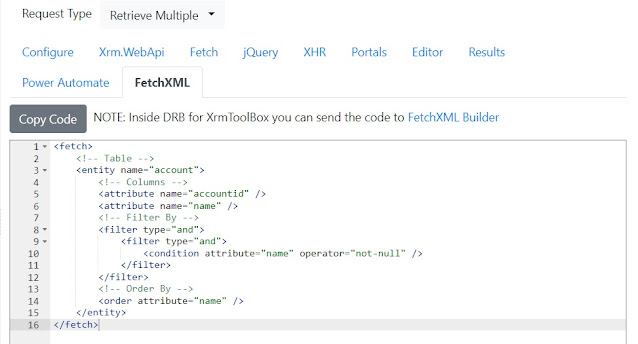
In the last version of DRB I just published (1.0.0.31) I added a new tab FetchXML for the Retrieve Single and Retrieve Multiple request types:

You can't create a 1 to 1 conversion between Web API and FetchXML because the two query languages are not compatible (meaning you can usually do more stuff with FetchXML) but it's possible to convert some queries (FetchXML Builder has the option to export to Web API for a while now).

To be honest adding the FetchXML tab to DRB was only an exercise for me (and the generated code can be improved), I don't think someone will use my tool to generate FetchXML when there is FetchXML Builder (I am also an avid user of the tool).

However it allowed me to refresh a bit the FetchXML syntax and more important dealing with two aspects inside the XrmToolBox version:
  • Sending information from the web page to the container hosting the WebView2 component
  • Use the integration between tools offered by the IMessageBusHost interface
The first can be done using chrome.webview.postMessage from the web page and listening to the event WebMessageReceived inside the container.

The second utilizes the OnOutgoingMessage event, my friend Jonas Rapp wrote a page with some examples: Integrate with FetchXML Builder

If you are curious on how these things work you can check the code from this repository.

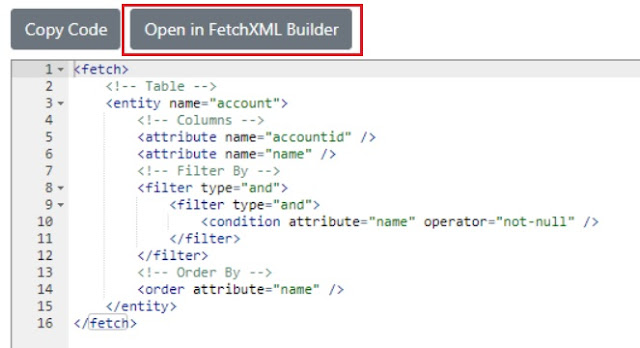
Leveraging this code, DRB can send the FetchXML code to FetchXML Builder when is executed inside XrmToolBox:
hope it helps!


January 24, 2022

Relationship Columns added to DRB filter

I admit I recently "spammed" Dataverse REST Builder when I answer questions regarding Dataverse Web API, often an error is related to the code syntax or to the query (especially when dealing with navigation properties) so having a tool to generate the syntax is useful in my opinion.


The error was not difficult to find but the intention of the author was something similar to this query:
"retrieve contacts where the account number of the parent account is X"

This kind of query was not possible to build with Dataverse REST Builder before, the filter capabilities were limited to the columns of the main table, so if you were retrieving contacts you were limited to contact columns.

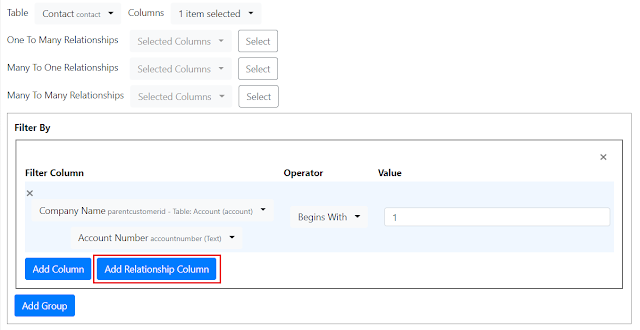
With the new version of DRB (1.0.0.26) it's possible to add "Relationship Columns" from the N:1 relationships, the next screenshot shows how it appears:


I highlighted the new button available inside the UI, relationship columns have also a different background color (in order to separate them from primary table columns).
The first dropdown is connected to the available N:1 relationships, the second one will list the columns of the related table.
Two important things:
  1. Not all the operators are available when dealing with relationship columns, for example the "Today" operator for DateTime columns (because the syntax looks for properties inside the main table), so I removed this kind of operators for relationship columns.
  2. Not all the relationships can be navigated and filtered, like the "Owner" one (but you can use the "Owning Team" or the "Owning User"), they appear inside the UI but an error appear when the query is executed.
To my understanding both points are limitations of the platform but maybe I am wrong, hope it helps.

January 15, 2022

Dataverse Web API and REST Client VS Code extension

If you use Visual Studio Code and worked with API you probably know the extension called REST Client. It has more than 2 million downloads, the advantages are that you can use it inside Visual Studio Code (meaning you don't need to have or switch to Postman) and it has a file format (.http) to save the requests.

Let me be clear here, I prefer Postman but as I said many times not everybody uses the same tools so let's explore a bit how REST Client extension works.

If you don't consider authentication it's pretty simple, you write your endpoint and you can click to execute the request, something like this:

What if you need to deal with authentication and the query is against the Dataverse Web API endpoint?
REST Client supports different types of authentication, the one we will use to query the Dataverse endpoint is Client Credentials, recently my friend Benedikt Bergmann published a very useful post for Power Automate (link here) but you can use the first part to configure the App Registration and the required app user.
After we get the required details (Client Id, Client Secret and Tenant Id) we are ready to add the authentication to REST Client.
What I am writing here is not discovered by me, I just combined the information found from this Healthcare API Microsoft Docs page and this post by MVP Geert van der Cruijsen.

First of all we create/update the settings.json in order to add the required syntax by REST Client to add environment variables, like this:

{
    "rest-client.environmentVariables": {
        "$shared": {},
        "Dataverse": {
            "url": "https://mydemo.crm.dynamics.com",
            "tenantid": "89d6b4f0-f93c-4d88-800c-ff6acdae523a",
            "clientid": "71aa6fe0-040f-493f-b19d-9f248692bf93",
            "clientsecret": "notsosecret"
        }
    }
}

If you are familiar with REST Client you probably done something similar, in the above example we defined a "Dataverse" environment and we can use the defined variables.

REST Client format allows to save multiple requests in a single .http file and reuse variables filled by previous requests, the idea here is to first execute a request to get the bearer token and use it as authorization for the next requests.

If we use the V2 Endpoint the request would be like this:

### Get Access Token
# @name getAADToken
POST https://login.microsoftonline.com/{{tenantid}}/oauth2/v2.0/token
Content-Type: application/x-www-form-urlencoded

grant_type=client_credentials&client_id={{clientid}}&client_secret={{clientsecret}}&scope={{url}}/.default

### Extract access token from getAADToken request
@token = {{getAADToken.response.body.access_token}}
  
We are using the variables defined inside the settings.json and store the bearer token inside a variable called token.

After we can add to the same .http file a request to Dataverse Web API using the token variable:
### Get Contacts
GET {{url}}/api/data/v9.1/contacts?$select=contactid,fullname
Authorization: Bearer {{token}}
OData-MaxVersion: 4.0
OData-Version: 4.0
Content-Type: application/json; charset=utf-8
Accept: application/json
Prefer: odata.include-annotations=*
      
In this way you can now execute your queries inside REST Client.
Why I am writing this? because the latest version of Dataverse REST Builder I just published (1.0.0.24) has a new option to export the requests for REST Client.

The first option "Export REST Client Environment" allows you to create a sample settings.json with the variables I described above, the second option "Export as REST Client Collection (.http)" allows you to download the requests inside the collection as .http file including the authentication request (you can also select the V1 or V2 endpoint)

Hope it helps

January 12, 2022

Dataverse REST Builder and Lookups

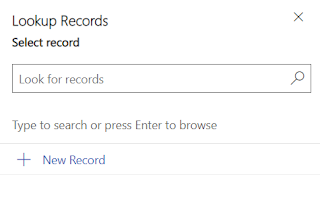
When I created Dataverse REST Builder I liked very much the idea to use Xrm.Utility.lookupObjects, having a custom page using this function makes (at least for me) the application more integrated with the system, also many requests (like Retrieve Single or the Associate/Disassociate) require to insert the ID of a record.

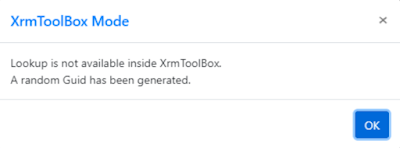
When Dataverse REST Builder was executed inside XrmToolBox, the following message appeared:

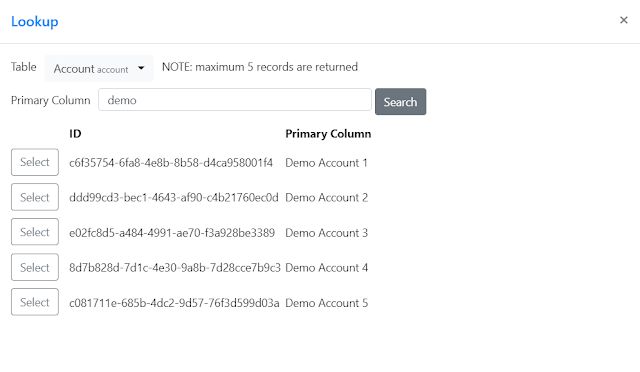
To make up for this, inside the latest version (1.0.0.23) I added a lookup function when DRB is executed outside a Dynamics 365/Power Apps context, to facilitate users to search and select the ID of a record.
The functionality is simple and limited, after a table is selected a search term for the primary column must be specified (it works with a "contains"/"like" logic) and after click "Search" maximum 5 records are returned (ordered by the primary column of the table).
If one of the results is the one you wish, clicking the "Select" button will bring the ID and the table logical name back to the application.
Hope it helps.

December 17, 2021

Dataverse REST Builder and XrmToolBox

The XrmToolBox version of Dataverse REST Builder is out, you can download it from the Tool Library inside XrmToolBox.

When creating a new tool for Dynamics 365/Dataverse, XrmToolBox is usually the first choice. It's a well known application, there are already several essential tools for it, you connect to your instance and you are ready.

When I created Dataverse REST Builder I went for a different path, a classic Managed Solution, but why?

Main reason is Xrm.WebApi, the client api created by Microsoft to deal with Web API is available only inside a Dynamics 365/Power Apps instance, it makes sense (at least for me) to create a tool running inside the instance in order to test this correctly.

Second reason is Windows Forms, although it's possible to recreate the same functionalities using the Windows Forms controls they would not have the same look and feel, (and I know I stressed others about this in the past, sorry) the dropdown library used inside DRB it's very convenient for me, I like to use it.

There are other reasons why you may prefer a Managed Solution (you use a Mac or you can't use XrmToolBox for a specific customer) and if you need the functionality you can't be too much picky on how you can get it.

This doesn't mean I don't care about people demanding an XrmToolBox version, I also prefer to have it if possible, however of one thing I was sure: I would not create a different codebase just for XrmToolBox.

There is another tool released as Managed Solution with an XrmToolBox version, Ribbon Workbench by Scott Durow. He may not recall this, but when we first met in London (June 2016) he anticipated me that he was working on the XrmToolBox version, and quickly described me the "bridge" required to make it works. I have fond memories of that trip, can't believe already 5 years passed.

Back to DRB, I knew it is technically possible to load a webpage inside XrmToolBox but it isn't the main problem. DRB is written using JavaScript + jQuery libraries, when I write some code I try to find a syntax available also for IE 11 but sometimes is not possible for everything (like some external libraries I use) and this is the case for DRB, it doesn't work inside IE 11.

Not big deal if you use the Managed Solution (just use a supported browser) but it's a big issue inside a Windows Forms application. Windows Forms has a control to display a webpage but uses the Internet Explorer engine, not the new Edge/Chromium one.

After doing some testing with WebView2 control and able to run DRB inside XrmToolBox, I shared my findings with Tanguy Touzard, he also needed this control for other functionalities and included it inside the release 1.2021.12.53.
If you are curious on how it works, the code of the tool is available inside this repository, inside DRB the code checks if the object coming from XrmToolBox is present.

I suggest this approach if you are planning to create a new tool? Absolutely not:

  • You are limited only to connections using a token based authentication, nowadays it should be the most common way to connect but isn't always the case.
  • You are forced to use the REST endpoint and not the official SDK, if you have the possibility to use the official SDK you should always prefer it, the new version of the SDK is still on public preview but it's mature enough in my opinion.

The XrmToolBox version of DRB comes with limitations, main one is of course the inability to execute Xrm.WebApi requests (but the code is generated), jQuery/XHR requests can be executed because behind the scenes I inject the authentication token.

One thing I expect is that probably more people will use DRB because is available inside XrmToolBox, this means more bugs discovered and more requests asked. If this is the case, please open a GitHub issue, comments in my blog or direct contact requests may be lost and if I receive them I will still ask you to open a GitHub issue.

I hope you find this tool useful.
December 11, 2021

File Columns and Web API

One of the recent and useful additions inside Dataverse is the File column. Prior to this type, files inside Dataverse were usually stored as a Note (annotation table) and having Notes is an option that customizers may prefer to don't enable (or you are dealing with a table like systemuser where you can't enable Notes).

You can find the official documentation regarding File columns here: link.

The page contains also some examples on how to deal with this type, both with REST requests and C# examples.

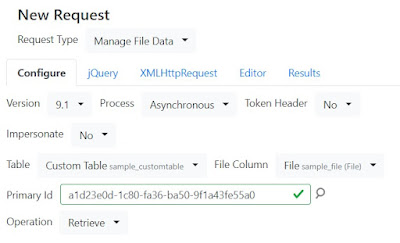
The latest version of Dataverse REST Builder (1.0.0.13) now includes a new request type called "Manage File Data" to deal with File Columns.

Note: This request is only available with jQuery and XMLHttpRequest, it should work also with Portals (and the safeAjax method) but I didn't test this scenario.

There are three operations available: Retrieve, Upload and Delete.
Retrieve and Delete are quite simple, they are just a GET and a DELETE request to the specific endpoints, the Upload one (it uses a PATCH) is quite tricky.
When Upload is selected a new textbox to specify the file name appears, there are two ways to pass the name using this operation, by url parameter or by header. I decided to use the url parameter, I encode the string before adding it to the main url and I implemented some checks to avoid special characters.
The content is another story, there are no REST examples inside the documentation so I did some tests.
First of all the expected format is binary, other types inside Dataverse, like the annotation table I mentioned above with the column documentbody or an Image column, require a Base 64 string.

Note: DRB allows the upload of images when dealing with Image columns, you can see this behavior also inside the demo with a Create/Update request to Custom Table and Image column.

I did some tests with a Base 64 string as source and converting the content to binary (with atob and other approaches) but the binary was always different from the original one (the Base 64 string was obtained with the FileReader object) probably due to encoding, so now DRB just shows an empty string, if in the future I can find a solution to this conversion I can add a Load button inside this request.

Note: With Postman you can select a file when the body is set to "Binary", the export from DRB handles this setting.

One of the reasons I had when I created DRB was to handle the new column types (choices, image, file), this version is another step forward to deal with them.

November 15, 2021

Web API Functions and Enum Types

Today my friend Natraj Yegnaraman tweeted a trick to get some organization details inside Power Automate, to be exact this one.

What caught my eyes was the syntax, I recognized it was a Web API Function (the parameter is listed inside the URL) but I didn't recognize the value format:
Microsoft.Dynamics.CRM.EndpointAccessType'Default'.

I checked the Web API Function reference and after the metadata, it was the infamous Enum Type.

Enum Types are special, they are internal (meaning you can't create them as input or output of a Custom API or a Custom Action) and the syntax on how to use them is not so precise, the only reference I found when I was developing Dataverse REST Builder is inside this page regarding structuralProperty.

There is also an example on how to use it but only for Xrm.WebApi, also they are quite rare (the metadata of a trial instance has only 55 Enum Types and many of them belong to Complex Types, another internal structure).

Inside previous versions of DRB you would see the following message, as it was an unknown type:

Natraj's tweet showed me the URL syntax to use with jQuery/XHR, in addition to the Xrm.WebApi syntax (the Microsoft documentation list all the values inside the enumProperties, but I found it just need the selected value and not the whole array).
After some changes I released a new version of Dataverse REST Builder (1.0.0.5) and now Enum Types are rendered correctly:
As I wrote before they are rare and probably you will not need to deal with, but it's nice to have a reference on how they can be used (the function RetrieveCurrentOrganization is now part of the DRB demo data).

November 1, 2021

Portals and Web API, why not?

After Portals Superhero and MVP Victor Dantas shared the news regarding Web API and Portals (link) I started to make the required changes to Dataverse REST Builder in order to support the new syntax, and a new version (1.0.0.2) is out:

This new functionality is in Preview, so if you are planning to use it make sure to read carefully the documentation, as syntax and functionalities may change. Inside the new tab "Portals" I added some comments with the current links.

In order to execute this new syntax DRB replaces the Portals endpoint ("/_api") with the standard Web API endpoint, this means you can generate the code also inside an instance where a portal is not installed, but this also means that is not 100% accurate, it's a trade-off.

You will find the new "Portals" tab for the following requests: Retrieve Single, Retrieve Multiple, Create, Update, Delete, Associate and Disassociate.

You can download the new version from GitHub: https://github.com/GuidoPreite/DRB


October 29, 2021

New DRB version, Web API and Postman

Two days ago I released Dataverse REST Builder (link) and I received many feedbacks about it, developers inside the Power Platform community found this new tool useful (and as I wrote before it would not exist without CRM REST Builder).

DRB generates Xrm.WebApi and jQuery/XHR code, the goal in my mind is to assist when writing JavaScript code, probably targeting a Model-Driven app. However I am well aware that not everybody works as I do and maybe they will use the tool in a different way.

When I was developing the tool I often checked the official Microsoft documentation regarding Web API (link) to understand some specific options and how the endpoint works but one section I noticed is Use Postman with the Web API. Postman is a tool I personally use but not too much for Dataverse, if I can use C# I prefer the official SDK and for JavaScript Xrm.WebApi is usually enough.

However Postman was a big inspiration, the idea to load/save a collection (and the possibility to create folders and requests at any level) is from there, I can't deny it.

After the first release I checked if it was possible to export a collection created in DRB to Postman, my json data structure holds more data but in a different format, however the generation code for jQuery/XHR is very similar to a Web API call: the url is exactly the same, differences are on how the headers are stored and how the body (for POST and PATCH requests) is written.

After some changes in my code I released the 1.0.0.1 version:

Beside the new "Export as Postman Collection (2.1)" functionality I also fixed a bug inside the "Create" and "Update" requestes for jQuery/XHR code generation.

The Postman collection is structured in a different way from the Microsoft tutorial, there are 4 variables and they are connected to the collection and not to an environment, the Authorization type is OAuth 2.0 and you need to generate a valid token after you imported the collection.

If you use a different authentication method and you think DRB can be expanded to include some settings during the export, open an issue and I will be happy to discuss there, I can't make promises (as this "Export as Postman Collection" is a totally separate functionality) but I am always interested on how people use the application.

The code is separated but some existing functions are still called during this export (for example the $filter clause for Retrieve Multiple is the same) so if something is not working inside Postman will be useful to know if the same problem happens inside Xrm.WebApi/jQuery/XHR or not.


October 27, 2021

New tool: Dataverse REST Builder

Note: new version has been released, read more here or download from GitHub

If you created Web API queries against CRM/Dynamics 365/Dataverse probably you are familiar with CRM REST Builder. The amazing tool created by Jason Lattimer helped me countless times in the past years and is a tool I still use today.

The ability to generate queries (especially with Xrm.WebApi when it was introduced) comes very handy, and CRM REST Builder has several functionalities but the one most used is probably the Retrieve Multiple one.

In the past years the development of CRM REST Builder has stopped and beside some bugs the other important missing thing is the compatibility with Unified Interface.

I decided to create a new tool to replace CRM REST Builder, and Dataverse REST Builder (DRB) is finally public at this repository:

https://github.com/GuidoPreite/DRB

 It comes with a Managed Solution to install inside your instance and it will popup inside the Apps list:

As I like to test my code offline, there is also a demo mode, so you can test the application before installing the solution: https://guidopreite.github.io/DRB/

The demo data is not complete but enough to understand how the application works and the demo table  called "Custom Table" contains the majority of columns available inside a Dataverse instance.

Main differences between CRM REST Builder and Dataverse REST Builder are:

  • DRB does not support the 2011 Endpoint (so if you still need it you can continue to use CRM REST Builder)
  • DRB allows to create, save and load a collection of requests, useful if you need to store somewhere the Web API queries you created
  • Support for new columns like "Choices" (also known as Multi Select Option Sets) and better support for "Image" and "File" columns
  • Ability to create requests to execute Custom API
  • A specific request to execute a classic Workflow
  • For Retrieve Single, Create, Update, Delete, it generates also the code for Xrm.WebApi.online.execute

DRB is not perfect and probably there are some bugs as well, but the main functionalities are available and I prefer to release it and gather some feedback.

Some may ask why I decided to create a new tool and not update the existing one. Is a valid concern and I thought about it too, in the end I decided to start from scratch. Main reason is that I had already a solid base to deal with dropdowns (as in my previous tool DOSM) and I designed the application with a different approach, the fact that you can save a collection of requests divides the tool in 3 main parts: a json data structure to hold the request, a UI to manipulate the json data structure and a code generation part accepting the json data structure to create the code.

As developers we need this tool? Honestly not too much, CRM REST Builder is still a great and working tool, and Dataverse REST Builder would not exist without it, I just felt that sometimes we need to deal with new column types or new requests and it's nice to have now a tool.

Hope you find Dataverse REST Builder useful and if something is not working you can open an issue inside the GitHub repo!