Showing posts with label #Builder. Show all posts

October 18, 2022

Dataverse REST Builder available as Browser Extension

Today (18 October 2022) I did a session at WPC 2022 about Dataverse Web API and I announced that Dataverse REST Builder is now available as browser extension for Google Chrome and Microsoft Edge, here the links if you are interested:

Chrome Web Store

Microsoft Edge Add-ons

Big thanks to my friend Natraj Yegnaraman for suggesting me the idea, his "Level up for Dynamics 365/Power Apps" extension is well known to Dynamics 365/Power Apps users.

How it works Dataverse REST Builder Browser Extension? After you click on the extension icon you are prompted to enter the Environment URL in order to get the Access Token:
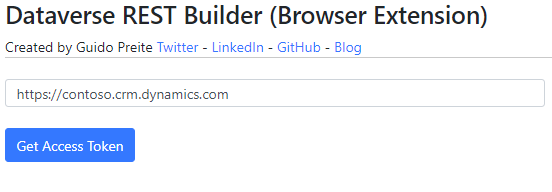
After you authenticate, Dataverse REST Builder is loaded in the same way as the XrmToolBox, Managed Solution and Dataverse DevTools versions.

How Dataverse REST Builder is able to obtain the Bearer Token in this scenario? It uses the same Application Client ID defined inside the Microsoft documentation in order to work with Postman: Set up a Postman environment

This Client ID allows two callback URLs, https://localhost and https://callbackurl, inside a browser extension we are able to obtain the URL return after the authentication process is completed (the token is one of the parameters), similar of what Postman does (maybe you don't remember but Postman started as a browser extension).

This solved the main problem, running Dataverse REST Builder inside an extension was indeed possible and doesn't require me to register an Azure application that maybe needs to be whitelisted by your organization, it uses a Microsoft Application Client ID.

The other problem was the use of eval() function to execute the generated code (keep in mind that for generating just the code eval() is not used). Browser extensions stop eval() due to security concerns, however with V3 specifications there is a possibility to load a page inside a sandbox (details here) allowing the use of eval(), so you can execute the generated code as well (Xrm.WebApi still works only with the Managed Solution version).

This is also the reason why there isn't a Firefox extension, Firefox extensions still use V2 specifications and there isn't a concept of sandbox. If in the future they allow this approach I think I can release DRB for Firefox too.

The Browser Extension version can be improved (I have already some ideas), let's see what the future brings.

During the next days I will update the other versions to match the version number (the Browser Extension currently shows 1.0.0.40) and publish the code to a separate GitHub repository.

I hope you find this version useful.

October 27, 2021

New tool: Dataverse REST Builder

Note: new version has been released, read more here or download from GitHub

If you created Web API queries against CRM/Dynamics 365/Dataverse probably you are familiar with CRM REST Builder. The amazing tool created by Jason Lattimer helped me countless times in the past years and is a tool I still use today.

The ability to generate queries (especially with Xrm.WebApi when it was introduced) comes very handy, and CRM REST Builder has several functionalities but the one most used is probably the Retrieve Multiple one.

In the past years the development of CRM REST Builder has stopped and beside some bugs the other important missing thing is the compatibility with Unified Interface.

I decided to create a new tool to replace CRM REST Builder, and Dataverse REST Builder (DRB) is finally public at this repository:

https://github.com/GuidoPreite/DRB

 It comes with a Managed Solution to install inside your instance and it will popup inside the Apps list:

As I like to test my code offline, there is also a demo mode, so you can test the application before installing the solution: https://guidopreite.github.io/DRB/

The demo data is not complete but enough to understand how the application works and the demo table  called "Custom Table" contains the majority of columns available inside a Dataverse instance.

Main differences between CRM REST Builder and Dataverse REST Builder are:

  • DRB does not support the 2011 Endpoint (so if you still need it you can continue to use CRM REST Builder)
  • DRB allows to create, save and load a collection of requests, useful if you need to store somewhere the Web API queries you created
  • Support for new columns like "Choices" (also known as Multi Select Option Sets) and better support for "Image" and "File" columns
  • Ability to create requests to execute Custom API
  • A specific request to execute a classic Workflow
  • For Retrieve Single, Create, Update, Delete, it generates also the code for Xrm.WebApi.online.execute

DRB is not perfect and probably there are some bugs as well, but the main functionalities are available and I prefer to release it and gather some feedback.

Some may ask why I decided to create a new tool and not update the existing one. Is a valid concern and I thought about it too, in the end I decided to start from scratch. Main reason is that I had already a solid base to deal with dropdowns (as in my previous tool DOSM) and I designed the application with a different approach, the fact that you can save a collection of requests divides the tool in 3 main parts: a json data structure to hold the request, a UI to manipulate the json data structure and a code generation part accepting the json data structure to create the code.

As developers we need this tool? Honestly not too much, CRM REST Builder is still a great and working tool, and Dataverse REST Builder would not exist without it, I just felt that sometimes we need to deal with new column types or new requests and it's nice to have now a tool.

Hope you find Dataverse REST Builder useful and if something is not working you can open an issue inside the GitHub repo!