Showing posts with label google chrome. Show all posts

December 3, 2014

Browser compatibility & Dynamics CRM: a complicated marriage

The introduction of browser compatibility in Dynamics CRM (launched with UR12 for CRM 2011) was a big step for everybody using the platform, sadly this important change wasn't painless.
Several CRM implementations were done considering that Internet Explorer was the only compatible browser and this was quite the standard until CRM 4.0. With CRM 2011 Microsoft provided JavaScript supported methods (the Xrm namespace) to interact with Dynamics CRM in order to avoid DOM Manipulation.

Dynamics CRM developers struggle everyday between top-notch requirements and the limits of supported customizations, an endless fight without a definitive winner.

From some months a new variable must be considered: the browser used and its version. I already wrote about the argument (The browser compatibility cake is a lie) but new issues surfaced with the latest version of Google Chrome (V39) and a small recap regarding the browser compatibility can be useful.

Fact number 1: The supported browsers are Internet Explorer, Firefox, Google Chrome, Safari.
Not all OS are supported, for example Firefox and Google Chrome are not supported on Mac OSX, so it's necessary to check the compatibility lists.

Fact number 2: Google Chrome is the browser that caused most of the issues.
It's started with V37 with the removal of the showModalDialog method (fix link) and continued in V38 with the partial introduction of ES6 support (details link). V39 has a window.close error connected to the showModalDialog function (Chromium issue), where the popups (like a solution import) don't close by themselves after they completed the job.

Fact number 3: showModalDialog will work only until 30 April 2015.
The EnableDeprecatedWebPlatformFeatures setting states clearly that is until the end of next April. Less than 5 months for this temporary solution. Maybe the HTML5 tag <dialog> will be used?

Fact number 4: Google doesn't provide an archive of Google Chrome releases.
You want to install Google Chrome V36? You need to find the offline setup somewhere else. Remember that installing an older browser version is not suggested (security reasons).

Personally I don't like the phrase "Internet Explorer is the preferred browser for Dynamics CRM" that sometimes I read in some forums, because Microsoft invested time and resources to provide the browser compatibility for Dynamics CRM, efforts vanished for the most part by an "aggressive" update policy of Google Chrome.
Keep informed your users about the browser compatibility status and guide them in the choice of the browser used for Dynamics CRM.

October 20, 2014

Google Chrome 38 Lookup Fix

In my previous post I analyzed the lookup issue caused by the latest version of Google Chrome (link) but I wasn't able to provide a solution.

UPDATE:
Google Chrome 38.0.2125.111 fixed the lookup error, please update it.

Some days ago Jon Grant wrote a JavaScript patch based on my post, you can find it here:
http://jongrant.org/2014/10/17/patch-for-chrome-38-lookup-error-in-dynamics-crm-2013/

His solution is unsupported but effective. Starting from his JavaScript patch I created a managed solution that includes this (unsupported) fix in all the entity forms.
The solution works with CRM 2013, but it's not tested with CRM 2011 UR12+.

Download from Codeplex:
https://chrome38lookupfix.codeplex.com/

REMEMBER THAT THIS SOLUTION IS UNSUPPORTED.

October 10, 2014

Lookup errors with Google Chrome 38

Google released a new version (38.0.2125.101) that breaks (again) Dynamics CRM. When users try to open a lookup they get the following error:

Currently there isn't a fix for this issue and it is not related to the previous showModalDialog issue.

UPDATE:
Google Chrome 38.0.2125.111 fixed the lookup error, please update it.

A managed solution (unsupported) that fix this issue is available:
Google Chrome 38 Lookup Fix

Offline installers of Google Chrome V37 (32 and 64 bit) are available:
Google Chrome 37.0.2062.124 32 bit (MD5: 6CF617A12FB9B7169B6C69D328F63389)
Google Chrome 37.0.2062.124 64 bit (MD5: 91644DE37A8EC506163FCBBCBD9AD0E4)

Microsoft Support KB Article regarding this issue: http://support2.microsoft.com/kb/3008160

Now I will explain what and how Google Chrome broke the lookup functionality:

When the user opens a lookup, CRM calls the web service AppWebServices/LookupService.asmx (message RetrieveInlineSearchResults) in order to fetch the preview records:

With Internet Explorer and Firefox the web service returns 200 (OK) but with Google Chrome it returns 500 (Internal Server Error). Which is the difference between the POST request made by Chrome and the other browsers?
The correct request body is the following:
<?xml version="1.0" encoding="utf-8" ?>
<soap:Envelope xmlns:soap="http://schemas.xmlsoap.org/soap/envelope/" xmlns:xsi="http://www.w3.org/2001/XMLSchema-instance" xmlns:xsd="http://www.w3.org/2001/XMLSchema">
    <soap:Body>
        <RetrieveInlineSearchResults xmlns="http://schemas.microsoft.com/crm/2009/WebServices">
            <typesArray>
                <int>1</int>
                <int>2</int>
            </typesArray>
            <bindingColumns></bindingColumns>
            <additionalParameters>...</additionalParameters>
            <positions>
                <int>0</int>
            </positions>
            <resolveEmailAddress>false</resolveEmailAddress>
            <savedQueryTypeParameter></savedQueryTypeParameter>
            <defaultViewId></defaultViewId>
            <values>
                <string></string>
            </values>
            <sortResults>true</sortResults>
        </RetrieveInlineSearchResults>
    </soap:Body>
</soap:Envelope>
Chrome V38 doesn't add the piece
            <values>
                <string></string>
            </values>
causing the web service call to fail.
I debugged the CRM JavaScript and I found the connected piece of code (JsProvider.ashx):
!isNullOrEmptyString($v_D) && $v_0.SetParameter("values", $v_6);
$v_6 contains the text inside the lookup, after CRM will put this value inside an array called aParameters (script global.ashx) in order to build the SOAP request.
CRM doesn't use an object but an array to handle the values and check with a function called IsNull if the value is already inside the parameters:
function pushCommandParameter(oParameter) {
    // oParameter.Name is "values"
    if (!IsNull(aParameters[oParameter.Name])) // Google Chrome returns always true when oParameter.Name is "values" !!!
        aParameters[aParameters[oParameter.Name]] = oParameter;
    else {
        aParameters[oParameter.Name] = aParameters.length;
        aParameters.push(oParameter);
    }
}
Google Chrome returns something when you access the property "values" of an array. This can be easily tested:
var myArray = new Array();
alert(myArray['values']); // it returns function values() { [native code] }
alert(myArray['anotherparameter']); // it returns undefined
Due to this new behavior of the arrays the SOAP request is not created correctly (the missing <values><string></string></values> piece) and CRM returns 500 (Internal Server Error).

Which is the reason of this change? Google Chrome V38 introduced a partial support for ECMAScript 6, including the method Array.prototype.values() that causes this behavior and consequently the lookup errors inside Dynamics CRM.

A fix is not available (an update of Google Chrome or Dynamics CRM is the only solution) so if you still have Google Chrome V37 you can disable the auto-update (instructions here) or use another browser (Internet Explorer or Firefox).

September 21, 2014

Manage multiple Dynamics CRM users with Google Chrome

Google Chrome is one of the supported browsers for Dynamics CRM, many users choose it because it's faster than Internet Explorer or because they need to access different CRM instances or the same instance with a different role, for example they use Internet Explorer to login with a System Administrator user and Google Chrome with a Sales Manager one.

This last scenario is very common for developers, consultants or administrators, they deal with different customers or CRM trials so everytime is necessary to sign out, find the username/password, sign in again, etc etc.

A very useful functionality offered by Google Chrome is the possibility to have multiple users on the same machine, each user will act as a standalone browser without sharing the settings. We can rely on this function in order to switch easily between Dynamics CRM users and/or instances.

Step by Step tutorial:

Open the Google Chrome menu on the browser toolbar and select Settings.
In the Users section, click Add new user...

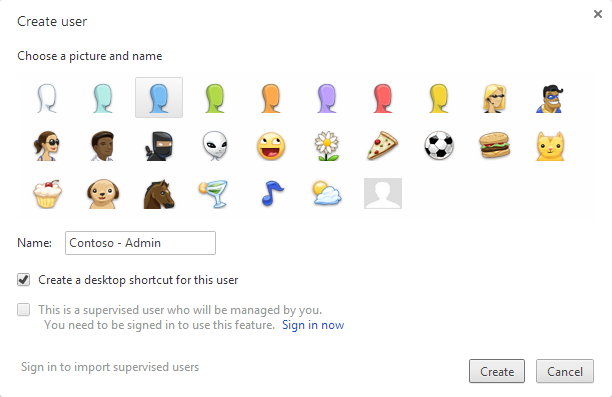
The following dialog will appear, select an icon and a name


You can select to have a desktop shortcut, to access directly the new user


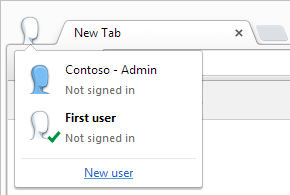
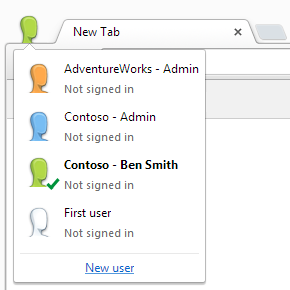
You can easily switch between the user by clicking the icon in the top left corner


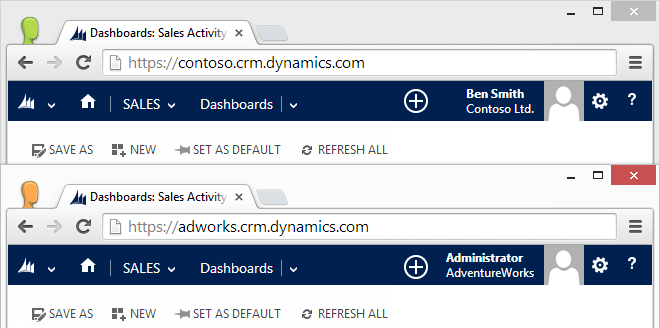
You can create users for different organizations or users for the same organization


And more important, you can run multiple users at the same time

September 12, 2014

Google Chrome registry fix for Dynamics CRM 2011/2013

Due to the errors caused by the latest Google Chrome update (details here) I created .reg file to reactivate showModalDialog API, you can download from here:

Enable Chrome showModalDialog.reg

After the download is completed close Google Chrome, double-click the .reg file and click Yes to the Registry Editor prompt:

I also created a page to test the showModalDialog API:

Test Page for showModalDialog API

September 8, 2014

The (browser compatibility) cake is a lie

Some days ago Google updated Google Chrome reaching version 37. Several Dynamics CRM users reported issues with this version like:
  • Export to Excel is not working
  • System settings are not saved
  • Form editor doesn't accept the changes
UPDATE:
A registry fix is available:
Google Chrome registry fix for Dynamics CRM 2011/2013

The reason is that showModalDialog API has been deprecated inside Chromium (the engine used by Google Chrome) more information here:
Disabling showModalDialog
Neil McDonald found a solution using a Group Policy, details in his blog:
Chrome 37 breaks CRM 2011 functionality

The current solution is "use another browser".

And before you are able to finish the word "browser" the obvious question is prompted to you: "But Microsoft states that Dynamics CRM is supported on the latest browser versions, why it's not working?"

The question is totally legit and MSDN has also a page about: Web application requirements for Microsoft Dynamics CRM 2013

Microsoft simply made a promise they can't always deliver, because they don't develop Google Chrome or the other browsers they decided to support, ergo "the cake is a lie".
With Google Chrome there is also another problem: you can't rollback to an older version because Google doesn't keep a public archive of their builds. So another question surfaces: "How can I avoid to have these issues again?"

The answer is to prioritize the supported browsers, naturally Internet Explorer will be your first choice (version 11, not version 8 please) and Firefox as an alternative, because they keep a public archive of their builds: https://ftp.mozilla.org/pub/mozilla.org/firefox/releases/
If in the future a Firefox release is not compatible with Dynamics CRM, the users can always install the previous working version (shame on you Google Chrome!).