September 21, 2014

Manage multiple Dynamics CRM users with Google Chrome

Google Chrome is one of the supported browsers for Dynamics CRM, many users choose it because it's faster than Internet Explorer or because they need to access different CRM instances or the same instance with a different role, for example they use Internet Explorer to login with a System Administrator user and Google Chrome with a Sales Manager one.

This last scenario is very common for developers, consultants or administrators, they deal with different customers or CRM trials so everytime is necessary to sign out, find the username/password, sign in again, etc etc.

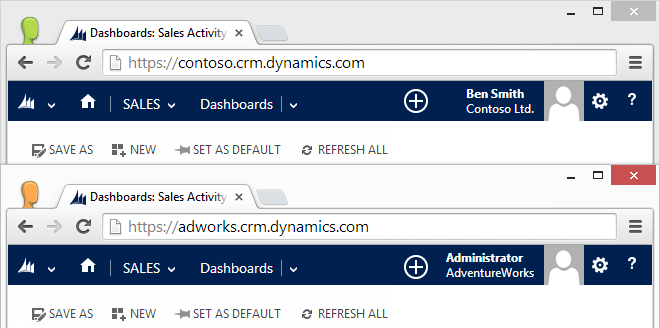
A very useful functionality offered by Google Chrome is the possibility to have multiple users on the same machine, each user will act as a standalone browser without sharing the settings. We can rely on this function in order to switch easily between Dynamics CRM users and/or instances.

Step by Step tutorial:

Open the Google Chrome menu on the browser toolbar and select Settings.

In the Users section, click Add new user...

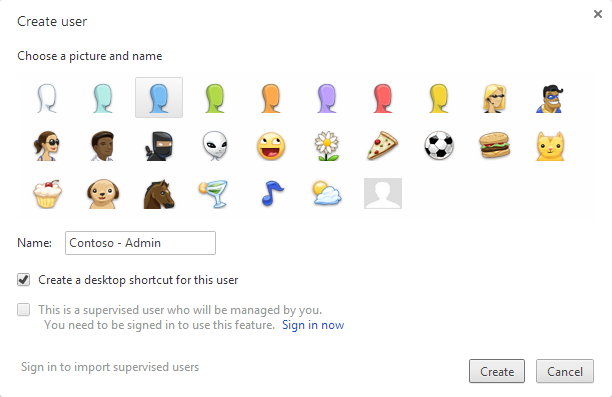
The following dialog will appear, select an icon and a name


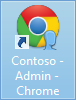
You can select to have a desktop shortcut, to access directly the new user


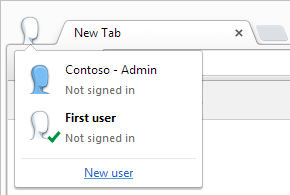
You can easily switch between the user by clicking the icon in the top left corner


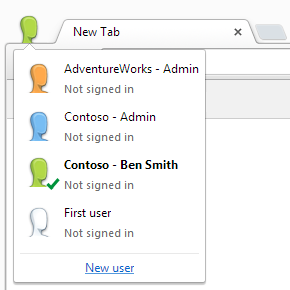
You can create users for different organizations or users for the same organization


And more important, you can run multiple users at the same time

September 12, 2014

Google Chrome registry fix for Dynamics CRM 2011/2013

Due to the errors caused by the latest Google Chrome update (details here) I created .reg file to reactivate showModalDialog API, you can download from here:

Enable Chrome showModalDialog.reg

After the download is completed close Google Chrome, double-click the .reg file and click Yes to the Registry Editor prompt:

I also created a page to test the showModalDialog API:

Test Page for showModalDialog API

September 8, 2014

The (browser compatibility) cake is a lie

Some days ago Google updated Google Chrome reaching version 37. Several Dynamics CRM users reported issues with this version like:
  • Export to Excel is not working
  • System settings are not saved
  • Form editor doesn't accept the changes
UPDATE:
A registry fix is available:
Google Chrome registry fix for Dynamics CRM 2011/2013

The reason is that showModalDialog API has been deprecated inside Chromium (the engine used by Google Chrome) more information here:
Disabling showModalDialog
Neil McDonald found a solution using a Group Policy, details in his blog:
Chrome 37 breaks CRM 2011 functionality

The current solution is "use another browser".

And before you are able to finish the word "browser" the obvious question is prompted to you: "But Microsoft states that Dynamics CRM is supported on the latest browser versions, why it's not working?"

The question is totally legit and MSDN has also a page about: Web application requirements for Microsoft Dynamics CRM 2013

Microsoft simply made a promise they can't always deliver, because they don't develop Google Chrome or the other browsers they decided to support, ergo "the cake is a lie".
With Google Chrome there is also another problem: you can't rollback to an older version because Google doesn't keep a public archive of their builds. So another question surfaces: "How can I avoid to have these issues again?"

The answer is to prioritize the supported browsers, naturally Internet Explorer will be your first choice (version 11, not version 8 please) and Firefox as an alternative, because they keep a public archive of their builds: https://ftp.mozilla.org/pub/mozilla.org/firefox/releases/
If in the future a Firefox release is not compatible with Dynamics CRM, the users can always install the previous working version (shame on you Google Chrome!).

August 20, 2014

South America Data Center Discovery URL

Recently Dynamics CRM Online has expanded its availability to several countries.
The announcement included another big news for the platform, the opening of a new data center located in Brazil to serve South America customers.

Microsoft defined also the Discovery Web Service URL of this data center, the address is:
https://disco.crm2.dynamics.com/XRMServices/2011/Discovery.svc

The data center is identified by the crm2 host, this will affect also the organization url, for example if Contoso Ltd. chooses the Brazil data center, its url will be:
https://contoso.crm2.dynamics.com

The relative MSDN page has been updated to include this change, the next table is a recap:

HostLocation
crmNorth America
crm4EMEA
crm5APAC
crm2South America

August 16, 2014

Dynamics CRM Mug Shot

Note: This is just a demo done in my spare time, nothing less nothing more

Dynamics CRM 2013 has the ability to display an image inside the form but in my opinion too many clicks are required to change it. First you need to click the picture box, wait that the dialog is loaded, click browse..., find the picture in your pc, click Open and finally click OK.

Note: This is an unsupported customization

I created a JavaScript library to make easier this procedure, it enable the picture box to be a target for a drag&drop, so you just need to drag your picture and it will be saved to CRM!

Because the code will run in the OnLoad event, it will take a bit to modify the picture box, you will notice a dashed border when the picture box is enabled for drag&drop:

You can download the library from my OneDrive:
mugshot.js

It is necessary to add the library to the form and attach the InitializeMugShot function to the OnLoad event.

But wait there's more...

I created also a WPF Application (I'm not a big fan of WPF but has its advantages) to grab a snapshot from your camera with the size required by Dynamics CRM (144x144 pixels):


The snapshots listed in the right part are draggable, so you can drag the snapshot you just took from your webcam directly to the CRM picture box! (or you can drag them to the desktop if you want to save as file).

you can download the application from my OneDrive:
MugShot.zip

Enjoy!

August 7, 2014

Dynamics CRM special data types

Dynamics CRM includes some data types not available for custom fields. Because these field types act slightly different from the standard ones, it's necessary to pay attention during development.

This post is focused on the following data types:
  • Owner
  • Customer
  • Party List (ActivityParty)
Owner
Owner is a data type used for the built-in OnwerId field. This field is present only when an entity has the Ownership set to User or Team, it's not present if the entity's ownership is Organization. It can hold one user or one team record.

Customer
Customer data type is used when a field can hold one account or one contact record. Contact and Lead entities use this data type (ParentCustomerId and CustomerId respectively).

Party List
Party List (also known as Activity Party) is the most complex data type, it can hold more than one record at the same time and the possible entities are defined by the ParticipationTypeMask attribute.
For example the Email To field can hold all these entities:


Client-side (JavaScript)
Handling these data types in JavaScript is quite easy, they look like and act as standard lookup fields, we need to only pay attention to the entity LogicalName (property entityType) of the record(s).

Owner
// set the owner of the current record to a team
// note: this code works only when the form is on create method, to update the owner it's always necessary to use the AssignRequest message

var team = new Array();
team[0] = new Object();
team[0].id = "c9c77fd3-036a-47e0-857d-a4d56f21d8ee";
team[0].name = "Sales Team";
team[0].entityType = "team";
Xrm.Page.getAttribute("ownerid").setValue(team);

// check if the owner is a team or a user
var owner = Xrm.Page.getAttribute("ownerid").getValue();
if (owner != null) {
    alert("The owner type of this record is " + owner[0].entityType);
}
Customer
// set the parent customer of a contact

var parent = new Array();
parent[0] = new Object();
parent[0].id = "cd7f603d-e199-4b66-9ca7-3386093e9a50";
parent[0].name = "Test Account";
parent[0].entityType = "account";
Xrm.Page.getAttribute("parentcustomerid").setValue(parent);

// check if the customer of a lead is an account or a contact
var customer = Xrm.Page.getAttribute("customerid").getValue();
if (customer != null) {
    alert("The customer type of this lead is " + customer[0].entityType);
}
Party List
// set the to field of an email to a contact and a user

var recipients = new Array();
recipients[0] = new Object();
recipients[0].id = "72bf360d-3dd8-4538-a5ce-91a4be6af517";
recipients[0].name = "John Smith";
recipients[0].entityType = "contact";

recipients[1] = new Object();
recipients[1].id = "d4e1f6f5-1a2d-4571-bec7-9bd1ea1696d0";
recipients[1].name = "Tom Green";
recipients[1].entityType = "user";

Xrm.Page.getAttribute("to").setValue(recipients);

// get the total count of records inside the To field
var to = Xrm.Page.getAttribute("to").getValue();
if (to != null) {
    alert("The total count of records inside To field is " + to.length);
    alert("The last record type is " + to[to.length-1].entityType);
}
Server-side (C#)
Server-side we have some differences, although Owner and Customer data types are EntityReference, Party List type is an ActivityParty.

Owner
// set the owner of the current record to a team
// note: this code works only when the form is on create method, to update the owner it's always necessary to use the AssignRequest message

// late bound
EntityReference team = new EntityReference("team", new Guid("c9c77fd3-036a-47e0-857d-a4d56f21d8ee"));
entity["ownerid"] = team;

// early bound
EntityReference team = new EntityReference(Team.EntityLogicalName, new Guid("c9c77fd3-036a-47e0-857d-a4d56f21d8ee"));
MyEntity.OwnerId = team; 

// check if the owner is a team or a user

// late bound
if (entity.Contains("ownerid") && entity["ownerid"] != null) {
    EntityReference owner = (EntityReference)entity["owner"];
    Console.WriteLine("The owner type of this record is " + owner.LogicalName);
}
// early bound
if (MyEntity.OwnerId != null) {
    Console.WriteLine("The owner type of this record is " + MyEntity.OwnerId.LogicalName);
}
Customer
// set the parent customer of a contact

// late bound
EntityReference parent = new EntityReference("account", new Guid("cd7f603d-e199-4b66-9ca7-3386093e9a50"));
entity["parentcustomerid"] = parent;

// early bound
EntityReference parent = new EntityReference(Account.EntityLogicalName, new Guid("cd7f603d-e199-4b66-9ca7-3386093e9a50"));
MyEntity.ParentCustomerId = parent; 

// check if the customer of a lead is an account or a contact

// late bound
if (entity.Contains("customerid") && entity["customerid"] != null) {
    EntityReference customer = (EntityReference)entity["customerid"];
    Console.WriteLine("The customer type of this lead is " + customer.LogicalName);
}

// early bound
if (MyEntity.ParentCustomerId != null) {
    Console.WriteLine("The customer type of this lead is " + MyEntity.ParentCustomerId.LogicalName);
}
Party List
// set the to field of an email to a contact and a user

// late bound
Entity to1 = new Entity("activityparty");
to1["partyid"] = new EntityReference("contact", new Guid("72bf360d-3dd8-4538-a5ce-91a4be6af517"));
Entity to2 = new Entity("activityparty");
to2["partyid"] = new EntityReference("user", new Guid("d4e1f6f5-1a2d-4571-bec7-9bd1ea1696d0"));
entity["to"] = new Entity[] { to1, to2 };

// early bound
ActivityParty To1 = new ActivityParty();
To1.PartyId = new EntityReference(Contact.EntityLogicalName, new Guid("72bf360d-3dd8-4538-a5ce-91a4be6af517"));
ActivityParty To2 = new ActivityParty();
To2.PartyId = new EntityReference(SystemUser.EntityLogicalName, new Guid("72bf360d-3dd8-4538-a5ce-91a4be6af517"));
MyEntity.To = new ActivityParty[] { To1 , To2 }

// get the total count of records inside the To field

// late bound

if (entity.Contains("to") && entity["to"] != null) {
    EntityCollection to = (EntityCollection)entity["to"];
    Console.WriteLine("The total count of records inside To field is " + to.Entities.Count.ToString());
    if (to.Entities.Count > 0) {
        EntityReference lastparty = (EntityReference)to.Entities.Last()["partyid"];
        Console.WriteLine("The last record type is " + lastparty.LogicalName);
    }
}

//early bound
if (MyEntity.To != null) {
    Console.WriteLine("The total count of records inside To field is " + MyEntity.To.Count().ToString());
    if (MyEntity.To.Count() > 0) {
        Console.WriteLine("The last record type is " + MyEntity.To.Last().PartyId.LogicalName);
    }
}

July 25, 2014

Don't use getSelectedOption().text

OptionSet is a particular field in Dynamics CRM, basically is a key-value pair array, where the key is an integer and the value is a string.
Xrm Object provides several methods to interact with an OptionSet field, including the infamous getSelectedOption. But why a developer should avoid a supported Xrm method? The reason is simple, it can easily lead to JavaScript errors, as the getSelectedOption().text case.

getSelectedOption returns the selected option as an object with this structure:
// CustomerTypeCode OptionSet - Account Entity
{"value": 8, "text": "Prospect"}
It's true that we can access the object properties in order to get the label using the syntax getSelectedOption().text (and getSelectedOption().value) but only if the OptionSet field is not empty. If there isn't a value selected, the getSelectedOption() will return null and not an object.
// this code generates an error if the field is empty
var customerType = Xrm.Page.getAttribute("customertypecode").getSelectedOption().text;
A workaround is to check if the object is not null:
var customerType = "";
var option = Xrm.Page.getAttribute("customertypecode").getSelectedOption();
if (option != null) {
    customerType = option.text;
}
But Xrm object provides a separate method to retrieve the text of a selected OptionSet, this method is getText, and more important when no option is selected, getText will return an empty string value.

Error-free code:
var customerType = Xrm.Page.getAttribute("customertypecode").getText();
In the same way the standard getValue() must be used instead of getSelectedOption().value, it returns the integer selected value or null if the field is empty:
var customerValue = Xrm.Page.getAttribute("customertypecode").getValue();
if (customerValue != null) {
    // ...
} else {
    // ...
}
Note that getSelectedOption() can be still used in some scenarios, for example when we manipulate the OptionSet using AddOption,RemoveOption or getOptions methods and we want to compare the selected option as object with other values, but never use it to just retrieve the selected OptionSet label.