October 9, 2014

The Xrm.Page.data.refresh method

CRM 2013 introduced new client APIs, one is the Xrm.Page.data.refresh method.
The MSDN definition is:
Asynchronously refreshes and optionally saves all the data of the form without reloading the page.
Xrm.Page.data.refresh(save).then(successCallback, errorCallback);
Why we leverage on this method?
The obvious reason is that we want the actual data displayed on the form, the inner reason is due to the Dynamics CRM platform, a record can be updated in several ways including workflows or plugins operating server-side.
Most of the server-side events don't refresh the UI, but with the Xrm.Page.data.refresh method we can manually force the page to display the current values.

If we want a simple refresh we can just write:
Xrm.Page.data.refresh(false);
A small advice will appear during the operation

October 7, 2014

Dynamics CRM Compatibility List URLs

Microsoft updated the support page for Dynamics CRM and divided the Compatibility List based on the version.

The new URLs are:

Compatibility with Microsoft Dynamics CRM 2013
Compatibility with Microsoft Dynamics CRM 2011
Compatibility with Microsoft Dynamics CRM 4.0

My page Resources for CRM Developers has been updated to include these links.

October 4, 2014

Create custom currencies by code

Dynamics CRM allows to create custom currencies in addition to the standard ones provided by the system.

The entity involved is transactioncurrency and the follow attributes are required to create a new currency:
  • currencyname (string)
  • currencyprecision (int)
  • currencysymbol (string)
  • exchangerate (decimal)
  • isocurrencycode (string)
The attribute isocurrencycode requires an additional check, it must contains always three letters, digits and special characters are not allowed.

Example:
Entity newCurrency = new Entity("transactioncurrency");

newCurrency["currencyname"] = "My Currency";
newCurrency["currencyprecision"] = 2;
newCurrency["currencysymbol"] = "@";
newCurrency["exchangerate"] = 2m;
newCurrency["isocurrencycode"] = "MCU"; // 3 letters

Guid newCurrencyId = service.Create(newCurrency);

September 29, 2014

Check if a User has a specific Privilege

I came across a question on Dynamics Community forums where the asker wanted to check if a CRM User has or not a specific privilege of a custom entity.

He wanted to avoid the use of the RetrievePrincipalAccessRequest because it requires to provide an existing record id in order to perform the request. I agree with this, in addition the result of a RetrievePrincipalAccessRequest doesn't guarantee that the user has the privilege, but only that the user can access to that specific record (for example when the record is only shared to the user).

A good aspect of the privileges is that they respect a naming convention, so the Read privilege for the Account entity is called prvReadAccount, the Write privilege prvWriteAccount, etc etc. This naming convention is valid also for custom entity, so if we have an entity called new_SMS and we want to know if the user can create a new_SMS record, we will check for the prvCreatenew_SMS privilege.

The easy way it to check first that the privilege is inside the CRM and after to compare its Id with the values returned by a RetrieveUserPrivilegesRequest:
bool userHasPrivilege = false;

ConditionExpression privilegeCondition =
    new ConditionExpression("name", ConditionOperator.Equal, "prvCreatenew_SMS"); // name of the privilege
FilterExpression privilegeFilter = new FilterExpression(LogicalOperator.And);
privilegeFilter.Conditions.Add(privilegeCondition);

QueryExpression privilegeQuery = new QueryExpression
{
    EntityName = "privilege",
    ColumnSet = new ColumnSet(true),
    Criteria = privilegeFilter
};

EntityCollection retrievedPrivileges = service.RetrieveMultiple(privilegeQuery);
if (retrievedPrivileges.Entities.Count == 1)
{
    RetrieveUserPrivilegesRequest request = new RetrieveUserPrivilegesRequest();
    request.UserId = userId; // Id of the User
    RetrieveUserPrivilegesResponse response = (RetrieveUserPrivilegesResponse)service.Execute(request);
    foreach (RolePrivilege rolePrivilege in response.RolePrivileges)
    {
        if (rolePrivilege.PrivilegeId == retrievedPrivileges.Entities[0].Id)
        {
            userHasPrivilege = true;
            break;
        }
    }
}
The hard way it to build a single MEGA query to perform the same check (4 LinkEntity!):
bool userHasPrivilege = false;

QueryExpression privilegeQuery = new QueryExpression("privilege");
privilegeQuery.ColumnSet = new ColumnSet(true);
LinkEntity privilegeLink1 = new LinkEntity("privilege", "roleprivileges", "privilegeid", "privilegeid", JoinOperator.Inner);
LinkEntity privilegeLink2 = new LinkEntity("roleprivileges", "role", "roleid", "roleid", JoinOperator.Inner);
LinkEntity privilegeLink3 = new LinkEntity("role", "systemuserroles", "roleid", "roleid", JoinOperator.Inner);
LinkEntity privilegeLink4 = new LinkEntity("systemuserroles", "systemuser", "systemuserid", "systemuserid", JoinOperator.Inner);

ConditionExpression userCondition = new ConditionExpression("systemuserid", ConditionOperator.Equal, userId); // // Id of the User
ConditionExpression privilegeCondition = new ConditionExpression("name", ConditionOperator.Equal, "prvCreatenew_SMS"); // name of the privilege

privilegeLink4.LinkCriteria.AddCondition(userCondition);
FilterExpression privilegeFilter = new FilterExpression(LogicalOperator.And);
privilegeFilter.Conditions.Add(privilegeCondition);
privilegeQuery.Criteria = privilegeFilter;

privilegeLink3.LinkEntities.Add(privilegeLink4);
privilegeLink2.LinkEntities.Add(privilegeLink3);
privilegeLink1.LinkEntities.Add(privilegeLink2);
privilegeQuery.LinkEntities.Add(privilegeLink1);

EntityCollection retrievedPrivileges = service.RetrieveMultiple(privilegeQuery);
if (retrievedPrivileges.Entities.Count > 0) { userHasPrivilege = true; }

September 28, 2014

Entity.GetAttributeValue<T> and ActivityParty

GetAttributeValue<T> is a method of the Entity class, it is used to retrieve easily the entity's values. You can find a detailed overview by Dave Berry here:
Entity.GetAttributeValue Explained

Dynamics CRM includes a special data type called ActivityParty (an overview here) and despite its special status we can still use GetAttributeValue<T> method against the fields using this data type.

First of all the ActivityParty attributes hold an EntityCollection of activityparty entities, these entities are a pointer to the real records through the partyid attribute (EntityReference).
Entity email = service.Retrieve("email", emailId, new ColumnSet(true));
EntityCollection to = email.GetAttributeValue<EntityCollection>("to");
A big difference when using the GetAttributeValue<T> with the EntityCollection than the EntityReference is the case when the attribute is null.

With EntityReference the method GetAttributeValue<T> returns a null if the attribute is empty.
EntityReference parentAccountRef = account.GetAttributeValue<EntityReference>("parentaccountid");
if (parentAccountRef != null) { /* code here */ }
With EntityCollection we can have null if the attribute is not inside the collection or an EntityCollection with no values inside the Entities property if the attribute is empty but inside the attributes list.
The second scenario is very common, for example when retrieving an email, the attributes from,to,cc,bcc are always returned.
Entity email = service.Retrieve("email", emailId, new ColumnSet(true));
EntityCollection to = email.GetAttributeValue<EntityCollection>("to");
EntityCollection cc = email.GetAttributeValue<EntityCollection>("cc");
if (to != null) { Console.WriteLine("Records inside To: " + to.Entities.Count.ToString(); }
if (cc != null) { Console.WriteLine("Records inside Cc: " + cc.Entities.Count.ToString(); }
Even if we have an usable EntityCollection, it's necessary additional code to get the reference to the real records contained inside the ActivityParty attributes.
To simplify the access to the values I created an extension method (called GetEntityReferenceCollectionValue) to return an EntityReferenceCollection from an ActivityParty field:
public static EntityReferenceCollection GetEntityReferenceCollectionValue(
    this Entity entity, string attributeLogicalName)
{
    EntityReferenceCollection entityReferenceCollection = new EntityReferenceCollection();
    EntityCollection entityCollection = entity.GetAttributeValue<EntityCollection>(attributeLogicalName);
    if (entityCollection != null)
    {
        foreach (Entity item in entityCollection.Entities)
        {
            EntityReference partyIdReference = item.GetAttributeValue<EntityReference>("partyid");
            if (partyIdReference != null) { entityReferenceCollection.Add(partyIdReference); }
        }
    }
    return entityReferenceCollection;
}
EntityReferenceCollection is a class that holds a list of EntityReference, it's normally used inside the Associate/Disassociate operations, but nothing stop us to reuse it to hold all the EntityReference entries of an EntityCollection.

The use is straightforward:
Entity email = service.Retrieve("email", emailId, new ColumnSet(true));
EntityReferenceCollection to = email.GetEntityReferenceCollectionValue("to");
If it's necessary to retrieve the actual entities I created a method called GetEntitiesFromEntityReferenceCollection, it requires as parameters the IOrganizationService and the EntityReferenceCollection. The value returned is an IEnumerable<Entity>:
public static IEnumerable<Entity> GetEntitiesFromEntityReferenceCollection(
    IOrganizationService service, EntityReferenceCollection entityReferenceCollection)
{
    List<Entity> entities = new List<Entity>();
    foreach (EntityReference entityReference in entityReferenceCollection)
    {
        try
        {
            Entity entity = service.Retrieve(entityReference.LogicalName, entityReference.Id, new ColumnSet(true));
            entities.Add(entity);
        }
        catch { }
    }
    return entities.AsEnumerable<Entity>();
}
Example:
Entity email = service.Retrieve("email", emailId, new ColumnSet(true));
EntityReferenceCollection to = email.GetEntityReferenceCollectionValue("to");
var toEntities = GetEntitiesFromEntityReferenceCollection(service, to);

September 21, 2014

Manage multiple Dynamics CRM users with Google Chrome

Google Chrome is one of the supported browsers for Dynamics CRM, many users choose it because it's faster than Internet Explorer or because they need to access different CRM instances or the same instance with a different role, for example they use Internet Explorer to login with a System Administrator user and Google Chrome with a Sales Manager one.

This last scenario is very common for developers, consultants or administrators, they deal with different customers or CRM trials so everytime is necessary to sign out, find the username/password, sign in again, etc etc.

A very useful functionality offered by Google Chrome is the possibility to have multiple users on the same machine, each user will act as a standalone browser without sharing the settings. We can rely on this function in order to switch easily between Dynamics CRM users and/or instances.

Step by Step tutorial:

Open the Google Chrome menu on the browser toolbar and select Settings.

In the Users section, click Add new user...

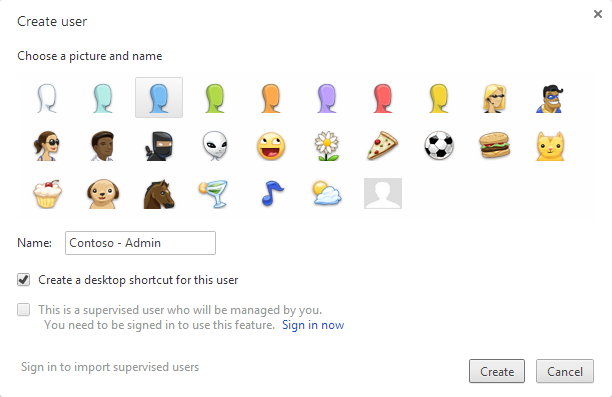
The following dialog will appear, select an icon and a name


You can select to have a desktop shortcut, to access directly the new user


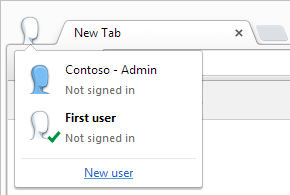
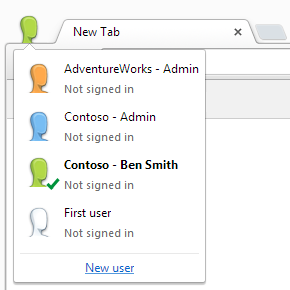
You can easily switch between the user by clicking the icon in the top left corner


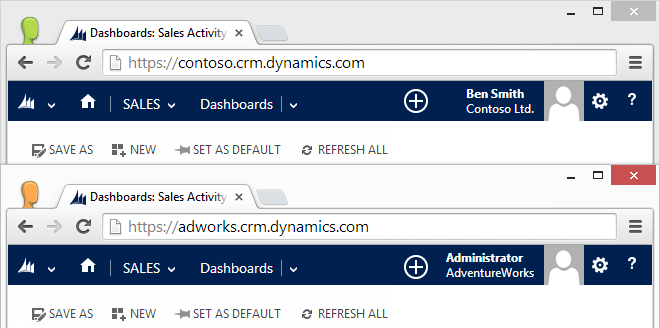
You can create users for different organizations or users for the same organization


And more important, you can run multiple users at the same time

September 12, 2014

Google Chrome registry fix for Dynamics CRM 2011/2013

Due to the errors caused by the latest Google Chrome update (details here) I created .reg file to reactivate showModalDialog API, you can download from here:

Enable Chrome showModalDialog.reg

After the download is completed close Google Chrome, double-click the .reg file and click Yes to the Registry Editor prompt:

I also created a page to test the showModalDialog API:

Test Page for showModalDialog API