January 30, 2014

CRM 2013 MB2-703 Exam - My Experience

Preamble: My job position is Microsoft Dynamics CRM Developer, I hold the CRM 2011 Customization and Configuration certification, in the past months I worked with CRM 2013 (online instance mostly)

Yesterday I passed my first CRM 2013 exam: MB2-703 Customization and Configuration, one of the four exams currently available for CRM 2013. (you can find the complete list here)

The exam has just been published, normally I don't rush on certifications but I had a voucher due to expire, in addition I didn't feel ready for the other exam I'm currently preparing.

I had few days to prepare for the exam, but Microsoft released the exam details some days ago, and that was my starting point (and should be your too):

http://www.microsoft.com/learning/en-us/exam.aspx?ID=mb2-703

The "Overview" and "Skill Measured" sections give you a good summary of the exam, and clarify the targets. Because this exam is the natural evolution of the CRM 2011 version and several concepts are still the same, I studied again the MB2-866 study notes from mscrmgeek.com (the site is currently offline, so I made a doc from the google cache and shared here: https://1drv.ms/w/s!AlhBTblgMrjkinvNdNH63asH0vtm)

Of course not all the things are still the same, so my suggestion is to study/check these notes with a CRM 2013 instance.

But this is still a CRM 2013 exam, what else did I study? As I wrote before I worked with CRM 2013, but I wasn't able to see all the new stuff, so I googled "crm 2013 new features" and I found relevant entries:

http://www.powerobjects.com/blog/2013/09/06/top-10-new-features-of-crm-2013/

http://www.crmsoftwareblog.com/2013/11/top-7-new-features-in-crm-2013/

http://www.mohamedibrahim.net/blog/2013/10/11/whats-new-in-microsoft-dynamics-crm-2013-new-features-comparison-of-microsoft-dynamics-crm-2011-versus-crm2013-msdyncrm/

As you can see CRM 2013 is a big step forward for Dynamics CRM, so I made a list of the relevant arguments (keeping an eye on the official exam details), I searched other articles and watched youtube videos, for example I learned about Actions capabilities (http://inogic.com/blog/?p=12), an argument that I didn't face previously with the customers.

I also have a Windows RT tablet, useful to test the mobile features (but the app is available also for Windows 8, so no excuses to try it)

My final thoughts:
  • Try to pass the CRM 2011 certification (MB2-866) first, CRM 2011 is still relevant and will be useful when you face upgraded environments
  • CRM 2013 is not only a new UI, test by yourself the new features, with real word examples you can memorize them faster
  • Ask if you have doubts, Dynamics Community and MSDN forums are there for you
Good luck with your Dynamics CRM exams!

October 24, 2013

Dynamics CRM 2013 Mobile Apps (tablet and smartphone)

October 5, 2013

Get the current user inside a Workflow

Inside CRM 2011 Process editor it's not possible to get the current user, in some cases a reference can be necessary (specially for automated workflows) in order to set the right user when the workflow is used to create or assign records.
A Custom Workflow Activity can be created for this purpose, taking advantage of the InitiatingUserId property.
using System;
using System.Activities;
using System.Collections.Generic;
using System.Runtime.Serialization;
using Microsoft.Xrm.Sdk;
using Microsoft.Xrm.Sdk.Workflow;

namespace WFUtils
{
    public class GetCurrentUser : CodeActivity
    {
        [Output("Current User")]
        [ReferenceTarget("systemuser")]
        public OutArgument<EntityReference> CurrentUser { get; set; }
        protected override void Execute(CodeActivityContext context)
        {
            IWorkflowContext workflowContext = context.GetExtension<IWorkflowContext>();
            CurrentUser.Set(context, new EntityReference("systemuser", workflowContext.InitiatingUserId));

        }
    }
}
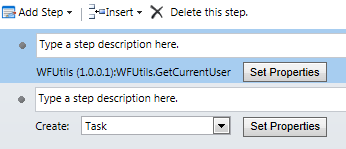
After the Custom Activity is deployed using the Plugin Registration Tool, a new step is available

and the output parameter (Current User) can be used inside other steps


July 16, 2013

How to bind a function to the Sub-Grid refresh event

A common customization requested by customers is to execute some logic when a Sub-Grid is refreshed. Unfortunately the Xrm Object Model doesn't provide a method to bind a function to the refresh event.
To implement this functionality is necessary to use unsupported JavaScript code, paying attention when a new rollup is released.
The following code is compatible with UR12/Polaris update that introduced cross-browser support for CRM 2011.
function AddEventToGridRefresh(gridName, functionToCall) {
   // retrieve the subgrid
   var grid = document.getElementById(gridName);
   // if the subgrid still not available we try again after 1 second
   if (grid == null) {
       setTimeout(function () {AddEventToGridRefresh(gridName, functionToCall);}, 1000);
       return;
   }
   // add the function to the onRefresh event
   grid.control.add_onRefresh(functionToCall);
}
Is possible to use the AddEventToGridRefresh function in two different ways. Assuming to attach the following function:
// function used in this example
function AdviseUser() {
   alert("Sub-Grid refreshed");
}
The function can be called directly passing the parameters inside the dialog box


or inside another JavaScript function:
function OnLoad() {
   AddEventToGridRefresh('accountContactsGrid', AdviseUser);
}
The first parameter is a string and quotation marks are necessary, the second parameter is the name of the function and must be written without quotation marks.

July 9, 2013

Set Account's Primary Contact as Recipient when creating a new Phone Call

When a new Phone Call is created starting from an Account, the default recipient is the Account itself.
If we want to set the Primary Contact of the Account as Recipient, we need to call the following function inside the OnLoad event of the Phone Call entity.
function ChangePhoneCallRecipientFromAccountToPrimaryContact() {
    // check if is a new phone call
    if (Xrm.Page.ui.getFormType() == 1) {
        // get the Phone Call To Recipient
        var to = Xrm.Page.getAttribute("to").getValue();
        // if the Recipient is an account we continue
        if (to != null && to[0].entityType == "account") {
            // get the account Id
            var accountId = to[0].id;    
            // get the right url for the OData Query
            var serverUrl;
            if (Xrm.Page.context.getClientUrl !== undefined) {
                serverUrl = Xrm.Page.context.getClientUrl();
            } else {
                serverUrl = Xrm.Page.context.getServerUrl();
            }
            // build the request
            var ODataPath = serverUrl + "/XRMServices/2011/OrganizationData.svc"; 
            var accountRequest = new XMLHttpRequest();
            accountRequest.open("GET", ODataPath + "/AccountSet(guid'" + accountId + "')", false); 
            accountRequest.setRequestHeader("Accept", "application/json"); 
            accountRequest.setRequestHeader("Content-Type", "application/json; charset=utf-8");
            // execute the request
            accountRequest.send();
            if (accountRequest.status === 200) {
                var retrievedAccount = JSON.parse(accountRequest.responseText).d;
                // retrieve the primary contact of the account
                var primaryContact = retrievedAccount.PrimaryContactId;
                // if there is a primary contact we set as new To Recipient
                if (primaryContact.Id != null) {
                    var newTo = new Array();
                    newTo[0] = new Object();
                    newTo[0].id = primaryContact.Id;
                    newTo[0].name = primaryContact.Name;
                    newTo[0].entityType = primaryContact.LogicalName;
                    Xrm.Page.getAttribute("to").setValue(newTo);
                }
            }
            else {
                alert("error");
            }
        }
    }
}

June 28, 2013

OptionSet JavaScript Helper Library

Xrm.Page object provides several methods to work with OptionSet attributes, the most used are:
  • Xrm.Page.getAttribute("optionset").getValue() - returns the selected item value
  • Xrm.Page.getAttribute("optionset").getText() - returns the selected item label
Sometimes is necessary to access all the items of an Optionset and not only the selected one, for this purpose I wrote a JavaScript library.

The library uses only supported JavaScript and doesn't query the metadata to retrieve the labels. It contains the following functions:

  • opt.GetValues(fieldName)
    returns an array with all the values of a specific OptionSet
    var freightTermsValues = opt.getValues("address1_freighttermscode");
    alert("Values inside Freight Terms OptionSet: " + freightTermsValues);
    
  • opt.GetLabels(fieldName)
    returns an array with all the labels of a specific OptionSet
    var shippingMethods = opt.getLabels("address1_shippingmethodcode");
    alert("Available Shipping Methods: " + shippingMethods);
    
  • opt.GetLabel(fieldName, value)
    returns the corresponding label for a specific OptionSet value
    var paymentTermLabel = opt.getLabel("paymenttermscode", 2);
    alert("Payment Term with Value 2 is: " + paymentTermLabel);
    
  • opt.GetValue(fieldName, label)
    returns the corresponding value for a specific OptionSet label
    var primaryValue = opt.getValue("address1_addresstypecode", "Primary");
    alert("Value for address type Primary is: " + primaryValue);
    
Library code:
if (typeof (opt) == "undefined") { opt = {}; }

opt.getValues = function (fieldName) {
    var values = [];
    var attribute = Xrm.Page.getAttribute(fieldName);
    if (attribute != null && attribute.getAttributeType() == "optionset") {
        var options = attribute.getOptions();
        for (var i in options) {
            if (options[i].value != "null") values.push(options[i].value * 1);
        }
    }
    return values;
};

opt.getLabels = function (fieldName) {
    var labels = [];
    var attribute = Xrm.Page.getAttribute(fieldName);
    if (attribute != null && attribute.getAttributeType() == "optionset") {
        var options = attribute.getOptions();
        for (var i in options) {
            if (options[i].value != "null") labels.push(options[i].text);
        }
    }
    return labels;
};

opt.getLabel = function (fieldName, value) {
    var label = "";
    var attribute = Xrm.Page.getAttribute(fieldName);
    if (attribute != null && attribute.getAttributeType() == "optionset") {
        var option = attribute.getOption(value);
        if (option != null) label = option.text;
    }
    return label;
};

opt.getValue = function (fieldName, label) {
    if (label == "") return null;
    var value = null;
    var attribute = Xrm.Page.getAttribute(fieldName);
    if (attribute != null && attribute.getAttributeType() == "optionset") {
        var options = attribute.getOptions();
        for (var i in options) {
            if (options[i].text == label) return options[i].value * 1;
        }
    }
    return value;
};
Note: developed with Xrm JavaScript Dojo

